---
title: "Secure messaging: How Does It Work?"
description: "The patient chat : How does it works ?"
---
[Skip to content](https://pro.doctoranytime.doctor/en-be/help-center/le-chat-patient-comment-fonctionne-t-il-#main-content)
- [English - Belgium](https://pro.doctoranytime.doctor/en-be/help-center/le-chat-patient-comment-fonctionne-t-il-)
- [Français - Belgique](https://pro.doctoranytime.doctor/fr-be/help-center/le-chat-patient-comment-fonctionne-t-il-)
- [Nederlands - België](https://pro.doctoranytime.doctor/nl-be/help-center/le-chat-patient-comment-fonctionne-t-il-)
English - Belgium
Show submenu for translations
[](https://www.doctoranytime.be/en)
Open main navigation
Close main navigation
- - [English - Belgium](https://pro.doctoranytime.doctor/en-be/help-center/le-chat-patient-comment-fonctionne-t-il-)
- [Français - Belgique](https://pro.doctoranytime.doctor/fr-be/help-center/le-chat-patient-comment-fonctionne-t-il-)
- [Nederlands - België](https://pro.doctoranytime.doctor/nl-be/help-center/le-chat-patient-comment-fonctionne-t-il-)
English - Belgium
Show submenu for translations
- [Contact us](https://pro.doctoranytime.be/en/en/contactus)
[Contact us](https://pro.doctoranytime.be/en/en/contactus?hsLang=en-be)
How can we help you?
- There are no suggestions because the search field is empty.
1. [Doctoranytime Help Center](https://pro.doctoranytime.doctor/en-be/help-center?hsLang=en-be)
2. [My Patients](https://pro.doctoranytime.doctor/en-be/help-center/my-patients?hsLang=en-be)
3. [Communication with my patients](https://pro.doctoranytime.doctor/en-be/help-center/my-patients?hsLang=en-be#communication-with-my-patients)
# Secure messaging: How Does It Work?
## Secure Messaging is a simple, centralized tool that allows you to communicate safely with patients who have already booked an appointment with you through the platform. It ensures privacy and complies with relevant confidentiality standards.
### What is the purpose of Secure Messaging?
Secure messaging allows you to:
- Communicate directly with your patients before and after an appointment (follow-up, additional information, instructions, etc.).
- Answer your patients’ questions securely.
- Send or receive documents (prescriptions, results, certificates, administrative documents, etc.).
It is a dedicated messaging space designed to improve follow-up and reduce exchanges by email or phone.
### How is communication security ensured?
- All messages and documents are exchanged within a secure environment.
- When a patient receives a message, they are notified by email, but the content of the message does **not** appear in the email for confidentiality reasons.
- The patient must log in to their account to view the message, ensuring full protection of their information.
### How am I notified of a new message?
When a patient writes to you, you receive:
- A notification in your practitioner interface.
- An email notification informing you that a message is available (without displaying its content).
You can then reply directly from your dashboard.
### Who can initiate the conversation?
- **You** can send a message to any patient who has already had an appointment with you.
- **The patient** can also initiate a conversation from their personal space for any questions related to their consultation if they have made an appointment with you in advance.
### How do I activate it?
Secure messaging is available with all subscription plans that include the agenda.
You can locate it here:
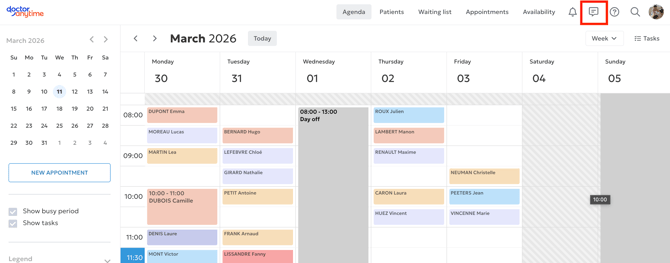
You can easily enable or disable it by clicking the three dots.
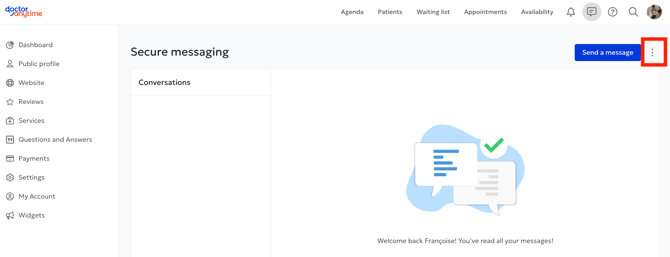
**Good to know:** Existing conversations will remain active.
If you need more information, feel free to contact the chat support or **care@doctoranytime.be**.
- [Get started](https://pro.doctoranytime.doctor/en-be/help-center/get-started?hsLang=en-be)
- [Account](https://pro.doctoranytime.doctor/en-be/help-center/account?hsLang=en-be#main-content)
- [Account Settings](https://pro.doctoranytime.doctor/en-be/help-center/account?hsLang=en-be#account-settings)
- [Users](https://pro.doctoranytime.doctor/en-be/help-center/account?hsLang=en-be#users)
- [Public profile](https://pro.doctoranytime.doctor/en-be/help-center/public-profile?hsLang=en-be#main-content)
- [Services and Treatments](https://pro.doctoranytime.doctor/en-be/help-center/public-profile?hsLang=en-be#services-and-treatments)
- [Promote Profile](https://pro.doctoranytime.doctor/en-be/help-center/public-profile?hsLang=en-be#promote-profile)
- [Practice Management](https://pro.doctoranytime.doctor/en-be/help-center/practice-management?hsLang=en-be)
- [Availability Management](https://pro.doctoranytime.doctor/en-be/help-center/availability-management?hsLang=en-be)
- [Agenda online](https://pro.doctoranytime.doctor/en-be/help-center/agenda-online?hsLang=en-be#main-content)
- [Agenda Settings](https://pro.doctoranytime.doctor/en-be/help-center/agenda-online?hsLang=en-be#agenda-settings)
- [My Patients](https://pro.doctoranytime.doctor/en-be/help-center/my-patients?hsLang=en-be#main-content)
- [Import database](https://pro.doctoranytime.doctor/en-be/help-center/my-patients?hsLang=en-be#import-database)
- [Patient restrictions](https://pro.doctoranytime.doctor/en-be/help-center/my-patients?hsLang=en-be#patient-restrictions)
- [Reviews](https://pro.doctoranytime.doctor/en-be/help-center/my-patients?hsLang=en-be#reviews)
- [Communication with my patients](https://pro.doctoranytime.doctor/en-be/help-center/my-patients?hsLang=en-be#communication-with-my-patients)
- [Appointments](https://pro.doctoranytime.doctor/en-be/help-center/appointments?hsLang=en-be)
- [Video consultation](https://pro.doctoranytime.doctor/en-be/help-center/video-consultation?hsLang=en-be#main-content)
- [Adding a new appointment](https://pro.doctoranytime.doctor/en-be/help-center/video-consultation?hsLang=en-be#adding-a-new-appointment)
- [Video-Consultation for medical centers](https://pro.doctoranytime.doctor/en-be/help-center/video-consultation?hsLang=en-be#video-consultation-for-medical-centers)
- [Data Security and information management](https://pro.doctoranytime.doctor/en-be/help-center/data-security-and-information-management?hsLang=en-be)
- [Questions and Answers](https://pro.doctoranytime.doctor/en-be/help-center/questions-and-answers?hsLang=en-be)
- [Online payment](https://pro.doctoranytime.doctor/en-be/help-center/online-payment?hsLang=en-be)
[.png?width=144&height=144&name=720x720gmail%20(1).png "doctoranytime")](http://www.doctoranytime.be)
[mailto:email@email.com](mailto:email@email.com)
Copyright © 2025, Doctoranytime