---
title: "La messagerie sécurisée : comment fonctionne-t-elle ?"
description: Comment fonctionne le chat patient ?
---
[Passer au contenu](https://pro.doctoranytime.doctor/fr-be/help-center/le-chat-patient-comment-fonctionne-t-il-#main-content)
- [Français - Belgique](https://pro.doctoranytime.doctor/fr-be/help-center/le-chat-patient-comment-fonctionne-t-il-)
- [English - Belgium](https://pro.doctoranytime.doctor/en-be/help-center/le-chat-patient-comment-fonctionne-t-il-)
- [Nederlands - België](https://pro.doctoranytime.doctor/nl-be/help-center/le-chat-patient-comment-fonctionne-t-il-)
Français - Belgique
Afficher le sous-menu pour les traductions
[](https://www.doctoranytime.be/)
Ouvrir la navigation principale
Fermer la navigation principale
- - [Français - Belgique](https://pro.doctoranytime.doctor/fr-be/help-center/le-chat-patient-comment-fonctionne-t-il-)
- [English - Belgium](https://pro.doctoranytime.doctor/en-be/help-center/le-chat-patient-comment-fonctionne-t-il-)
- [Nederlands - België](https://pro.doctoranytime.doctor/nl-be/help-center/le-chat-patient-comment-fonctionne-t-il-)
Français - Belgique
Afficher le sous-menu pour les traductions
- [Contact](https://pro.doctoranytime.be/fr/contactus)
[Contact](https://pro.doctoranytime.be/fr/contactus?hsLang=fr-be)
Comment pouvons-nous vous aider ?
- Il n'y a aucune suggestion car le champ de recherche est vide.
1. [Doctoranytime Help Center](https://pro.doctoranytime.doctor/fr-be/help-center?hsLang=fr-be)
2. [Mes Patients](https://pro.doctoranytime.doctor/fr-be/help-center/mes-patients?hsLang=fr-be)
3. [Communiquer avec mes patients](https://pro.doctoranytime.doctor/fr-be/help-center/mes-patients?hsLang=fr-be#communiquer-avec-mes-patients)
# La messagerie sécurisée : comment fonctionne-t-elle ?
## La messagerie sécurisée est un outil sécurisé permettant de faciliter les échanges entre vous et vos patients ayant déjà eu un rendez-vous avec vous via la plateforme. Il s’agit d’un canal simple, centralisé et conforme aux exigences de confidentialité.
#### À quoi sert la messagerie sécurisée ?
La messagerie sécurisée vous permet de :
- **Communiquer directement** avec vos patients avant et après un rendez-vous (suivi, informations complémentaires, consignes…).
- **Répondre aux questions** que vos patients souhaitent vous poser de manière sécurisée.
- **Envoyer ou recevoir des documents** (ordonnances, résultats, justificatifs, documents administratifs, etc.).
Il s’agit d’un espace de messagerie dédié, pensé pour améliorer le suivi et limiter les échanges par e-mail ou téléphone.
#### Comment la sécurité des échanges est-elle assurée ?
- Tous les messages et documents sont échangés via un **environnement sécurisé**.
- Lorsqu’un patient reçoit un message, il est **notifié par e-mail**, mais **le contenu du message n’apparaît pas dans l’e-mail** pour garantir la confidentialité.
- Le patient doit se connecter à son espace pour consulter le message, ce qui sécurise entièrement l’accès aux informations.
#### Comment suis-je averti d’un nouveau message ?
Lorsqu’un patient vous écrit, vous recevez :
- Une **notification dans votre interface praticien**.
- Un **e-mail de notification** vous informant qu’un message est disponible (sans en afficher le contenu).
Vous pouvez ensuite répondre directement depuis votre espace.
#### Qui peut initier la conversation ?
- **Vous** pouvez envoyer un message à tout patient ayant pris un rendez-vous avec vous.
- **Le patient** peut également initier un échange depuis son espace personnel, pour toute question en lien avec sa consultation s'il a pris rendez-vous avec vous au préalable.
#### Comment l'activer ?
La messagerie sécurisée est disponible pour **toutes les formules d'abonnement** avec l'agenda.
Il se trouve ici :
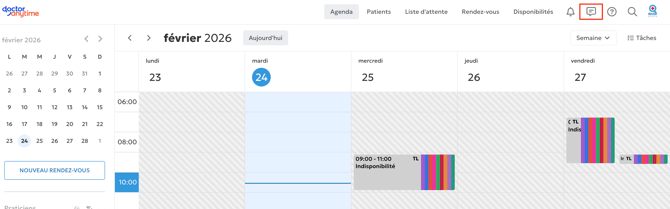
Vous pouvez facilement l'activer et le désactiver en cliquant sur les 3 points :
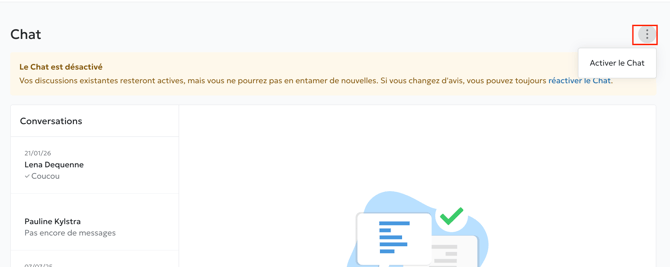
Bon à savoir : les discussions déjà ouvertes seront encore actives.
Si vous avez besoin de plus d'information, n'hésitez pas à contacter le support chat ou l'adresse **care@doctoranytime.be**.
- [Pour commencer](https://pro.doctoranytime.doctor/fr-be/help-center/pour-commencer?hsLang=fr-be)
- [Compte](https://pro.doctoranytime.doctor/fr-be/help-center/compte?hsLang=fr-be#main-content)
- [Paramètres du compte](https://pro.doctoranytime.doctor/fr-be/help-center/compte?hsLang=fr-be#param%C3%A8tres-du-compte)
- [Utilisateurs](https://pro.doctoranytime.doctor/fr-be/help-center/compte?hsLang=fr-be#utilisateurs)
- [Profil en ligne](https://pro.doctoranytime.doctor/fr-be/help-center/profil-en-ligne?hsLang=fr-be#main-content)
- [Services et traitements](https://pro.doctoranytime.doctor/fr-be/help-center/profil-en-ligne?hsLang=fr-be#services-et-traitements)
- [Promouvoir votre profil](https://pro.doctoranytime.doctor/fr-be/help-center/profil-en-ligne?hsLang=fr-be#promouvoir-votre-profil)
- [Gestion de votre cabinet](https://pro.doctoranytime.doctor/fr-be/help-center/gestion-de-votre-cabinet?hsLang=fr-be)
- [Gestion des disponibilités](https://pro.doctoranytime.doctor/fr-be/help-center/gestion-des-disponibilit%C3%A9s?hsLang=fr-be)
- [Agenda](https://pro.doctoranytime.doctor/fr-be/help-center/agenda?hsLang=fr-be#main-content)
- [Paramètres](https://pro.doctoranytime.doctor/fr-be/help-center/agenda?hsLang=fr-be#param%C3%A8tres)
- [Mes Patients](https://pro.doctoranytime.doctor/fr-be/help-center/mes-patients?hsLang=fr-be#main-content)
- [Importer la base de données](https://pro.doctoranytime.doctor/fr-be/help-center/mes-patients?hsLang=fr-be#importer-la-base-de-donn%C3%A9es)
- [Restrictions relatives aux patients](https://pro.doctoranytime.doctor/fr-be/help-center/mes-patients?hsLang=fr-be#restrictions-relatives-aux-patients)
- [Avis](https://pro.doctoranytime.doctor/fr-be/help-center/mes-patients?hsLang=fr-be#avis)
- [Communiquer avec mes patients](https://pro.doctoranytime.doctor/fr-be/help-center/mes-patients?hsLang=fr-be#communiquer-avec-mes-patients)
- [Les rendez-vous](https://pro.doctoranytime.doctor/fr-be/help-center/les-rendez-vous?hsLang=fr-be)
- [Vidéo Consultation](https://pro.doctoranytime.doctor/fr-be/help-center/vid%C3%A9o-consultation?hsLang=fr-be#main-content)
- [Ajouter un nouveau rendez-vous](https://pro.doctoranytime.doctor/fr-be/help-center/vid%C3%A9o-consultation?hsLang=fr-be#ajouter-un-nouveau-rendez-vous)
- [Video Consultation pour les centres médicaux](https://pro.doctoranytime.doctor/fr-be/help-center/vid%C3%A9o-consultation?hsLang=fr-be#video-consultation-pour-les-centres-m%C3%A9dicaux)
- [Sécurité des données et gestion des informations](https://pro.doctoranytime.doctor/fr-be/help-center/s%C3%A9curit%C3%A9-des-donn%C3%A9es-et-gestion-des-informations?hsLang=fr-be)
- [Questions et Réponses](https://pro.doctoranytime.doctor/fr-be/help-center/questions-et-r%C3%A9ponses?hsLang=fr-be)
- [Paiement en ligne](https://pro.doctoranytime.doctor/fr-be/help-center/paiement-en-ligne?hsLang=fr-be)
[.png?width=144&height=144&name=720x720gmail%20(1).png "doctoranytime")](http://www.doctoranytime.be)
[mailto:email@email.com](mailto:email@email.com)
Copyright © 2025, Doctoranytime