
How do I view the cancellation history?
- Go to the Patients tab.
- Search for the relevant patient using the search bar.
- Open the patient's profile.
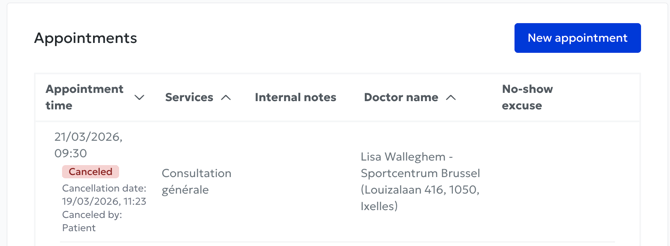
- View the appointment history: cancelled appointments are displayed alongside all other appointments. They are simply marked with a red "Cancelled" label.
What information is displayed?
For each cancelled appointment, you will find:- The date and time of the originally scheduled appointment.
- The date and time when the appointment was cancelled.
- Who cancelled the appointment: the patient, the secretary or the practitioner.
Why is this useful?
This feature allows you to:- Quickly identify patients who frequently cancel appointments.
- Check whether a cancellation was made by mistake or by an unauthorized person.
- Get an overview of a patient's reliability without having to manually search through the full list of cancelled appointments.