---
title: I want to see who cancelled an appointment
description: Would you like to know whether a patient has cancelled appointments in the past, when the cancellations occurred, and who cancelled them? This information is available directly from the patient's profile.
---
[Skip to content](https://pro.doctoranytime.doctor/en-be/help-center/je-veux-voir-qui-a-annulé-un-rendez-vous#main-content)
- [English - Belgium](https://pro.doctoranytime.doctor/en-be/help-center/je-veux-voir-qui-a-annul%C3%A9-un-rendez-vous)
- [Français - Belgique](https://pro.doctoranytime.doctor/fr-be/help-center/je-veux-voir-qui-a-annulé-un-rendez-vous)
- [Nederlands - België](https://pro.doctoranytime.doctor/nl-be/help-center/je-veux-voir-qui-a-annulé-un-rendez-vous)
English - Belgium
Show submenu for translations
[](https://www.doctoranytime.be/en)
Open main navigation
Close main navigation
- - [English - Belgium](https://pro.doctoranytime.doctor/en-be/help-center/je-veux-voir-qui-a-annul%C3%A9-un-rendez-vous)
- [Français - Belgique](https://pro.doctoranytime.doctor/fr-be/help-center/je-veux-voir-qui-a-annulé-un-rendez-vous)
- [Nederlands - België](https://pro.doctoranytime.doctor/nl-be/help-center/je-veux-voir-qui-a-annulé-un-rendez-vous)
English - Belgium
Show submenu for translations
- [Contact us](https://pro.doctoranytime.be/en/en/contactus)
[Contact us](https://pro.doctoranytime.be/en/en/contactus?hsLang=en-be)
How can we help you?
- There are no suggestions because the search field is empty.
1. [Doctoranytime Help Center](https://pro.doctoranytime.doctor/en-be/help-center?hsLang=en-be)
2. [Appointments](https://pro.doctoranytime.doctor/en-be/help-center/appointments?hsLang=en-be)
# I want to see who cancelled an appointment
## Would you like to know whether a patient has cancelled appointments in the past, when the cancellations occurred, and who cancelled them? This information is available directly from the patient's profile.
#### How do I view the cancellation history?
- Go to the **Patients** tab.
- Search for the relevant patient using the search bar.
- Open the patient's profile.
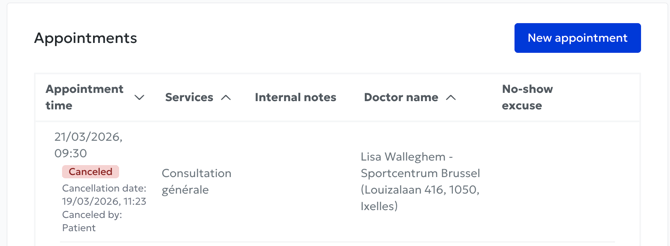
- View the appointment history: cancelled appointments are displayed alongside all other appointments. They are simply marked with a red **"Cancelled"** label.
#### What information is displayed?
For each cancelled appointment, you will find:
- The date and time of the originally scheduled appointment.
- The date and time when the appointment was cancelled.
- Who cancelled the appointment: the patient, the secretary or the practitioner.
#### Why is this useful?
This feature allows you to:
- Quickly identify patients who frequently cancel appointments.
- Check whether a cancellation was made by mistake or by an unauthorized person.
- Get an overview of a patient's reliability without having to manually search through the full list of cancelled appointments.
- [Get started](https://pro.doctoranytime.doctor/en-be/help-center/get-started?hsLang=en-be)
- [Account](https://pro.doctoranytime.doctor/en-be/help-center/account?hsLang=en-be#main-content)
- [Account Settings](https://pro.doctoranytime.doctor/en-be/help-center/account?hsLang=en-be#account-settings)
- [Users](https://pro.doctoranytime.doctor/en-be/help-center/account?hsLang=en-be#users)
- [Public profile](https://pro.doctoranytime.doctor/en-be/help-center/public-profile?hsLang=en-be#main-content)
- [Services and Treatments](https://pro.doctoranytime.doctor/en-be/help-center/public-profile?hsLang=en-be#services-and-treatments)
- [Promote Profile](https://pro.doctoranytime.doctor/en-be/help-center/public-profile?hsLang=en-be#promote-profile)
- [Practice Management](https://pro.doctoranytime.doctor/en-be/help-center/practice-management?hsLang=en-be)
- [Availability Management](https://pro.doctoranytime.doctor/en-be/help-center/availability-management?hsLang=en-be)
- [Agenda online](https://pro.doctoranytime.doctor/en-be/help-center/agenda-online?hsLang=en-be#main-content)
- [Agenda Settings](https://pro.doctoranytime.doctor/en-be/help-center/agenda-online?hsLang=en-be#agenda-settings)
- [My Patients](https://pro.doctoranytime.doctor/en-be/help-center/my-patients?hsLang=en-be#main-content)
- [Import database](https://pro.doctoranytime.doctor/en-be/help-center/my-patients?hsLang=en-be#import-database)
- [Patient restrictions](https://pro.doctoranytime.doctor/en-be/help-center/my-patients?hsLang=en-be#patient-restrictions)
- [Reviews](https://pro.doctoranytime.doctor/en-be/help-center/my-patients?hsLang=en-be#reviews)
- [Communication with my patients](https://pro.doctoranytime.doctor/en-be/help-center/my-patients?hsLang=en-be#communication-with-my-patients)
- [Appointments](https://pro.doctoranytime.doctor/en-be/help-center/appointments?hsLang=en-be)
- [Video consultation](https://pro.doctoranytime.doctor/en-be/help-center/video-consultation?hsLang=en-be#main-content)
- [Adding a new appointment](https://pro.doctoranytime.doctor/en-be/help-center/video-consultation?hsLang=en-be#adding-a-new-appointment)
- [Video-Consultation for medical centers](https://pro.doctoranytime.doctor/en-be/help-center/video-consultation?hsLang=en-be#video-consultation-for-medical-centers)
- [Data Security and information management](https://pro.doctoranytime.doctor/en-be/help-center/data-security-and-information-management?hsLang=en-be)
- [Questions and Answers](https://pro.doctoranytime.doctor/en-be/help-center/questions-and-answers?hsLang=en-be)
- [Online payment](https://pro.doctoranytime.doctor/en-be/help-center/online-payment?hsLang=en-be)
[.png?width=144&height=144&name=720x720gmail%20(1).png "doctoranytime")](http://www.doctoranytime.be)
[mailto:email@email.com](mailto:email@email.com)
Copyright © 2025, Doctoranytime