
The Doctoranytime Part-time subscription lets you open up to 16 hours of availability per week in your agenda.
- How does the 16-hour limit work?
With the Part-time subscription, you can set your working hours under “Availability” in your Doctoranytime agenda.
You can offer a maximum of 16 hours of available time slots per week.
- How can you check the hours used?
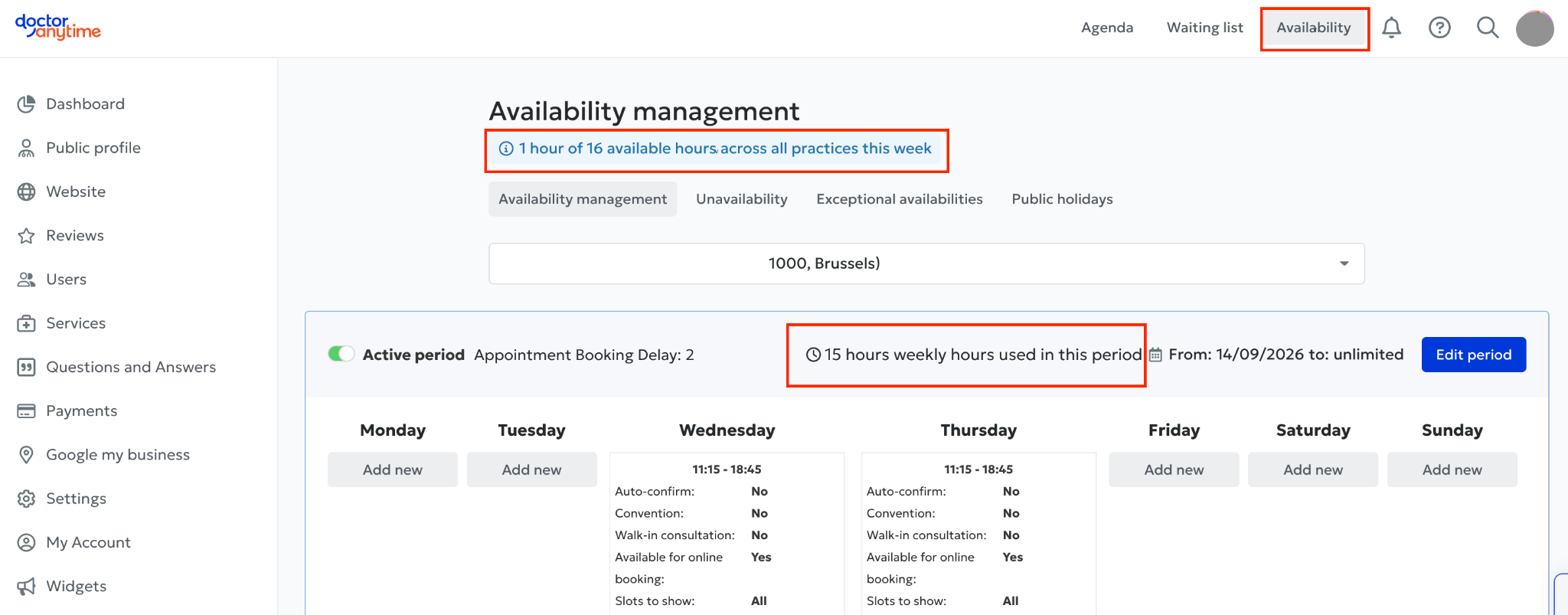
To check how many hours you have used:
- Log in to your Doctoranytime agenda.
- Go to the “Availability” tab.
- A box shows how many of the 16 permitted hours of availability you have already used.
This makes it easy to monitor your usage and adjust your schedule accordingly.
- What if you want to offer more than 16 hours per week?
If you have reached the 16-hour limit and would like to add more availability, you can switch to the Full-time subscription.
Unlike the Part-time subscription, the Full-time subscription does not limit the number of hours of availability in your agenda.
To change your subscription, contact our team at care@doctoranytime.be.