
On Doctoranytime, public holidays are automatically blocked in your agenda to prevent online bookings.
If you want to work on a public holiday, you can easily unblock it in your availability settings.
- Access public holiday settings
- Log in to your Doctoranytime agenda.
- Open the « Availability » tab at the top right of your agenda.
- Click « Public holidays », just above your practice address.
- Select the practice for which you want to unblock a public holiday.
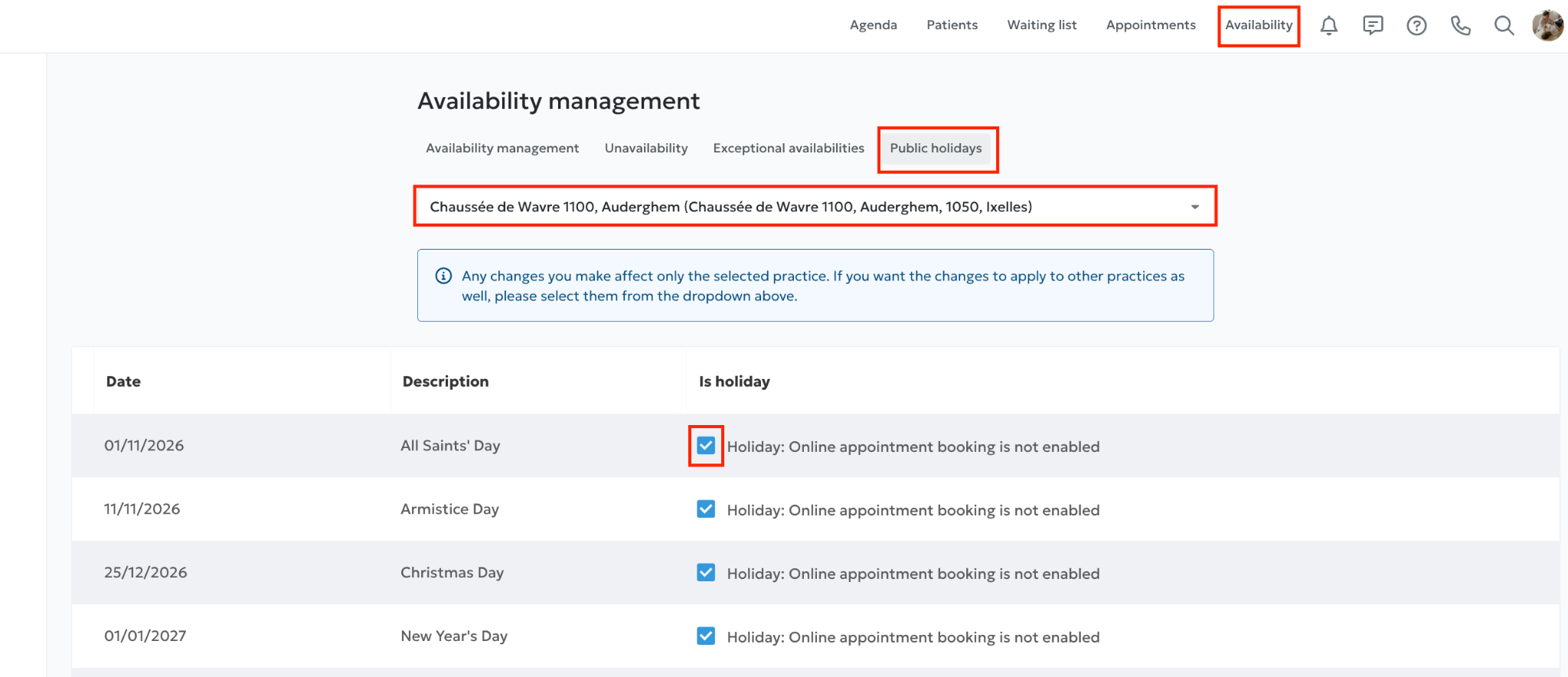
- Unblock a public holiday
In the « Public holidays » section:
- Find the public holiday on which you want to work.
Uncheck the box for that public holiday.
- The unavailability associated with that public holiday will automatically be removed from your agenda.
Important: it may take a few minutes for your agenda to update. If the unavailability is still visible, wait a little before checking again.
Good to know: if you work at several practices, you can also uncheck the public holiday in each one. This removes the related blocks from your different agendas and gives you a clearer overview.
- What hours will be offered to patients?
Once the public holiday is unblocked, your agenda automatically reverts to the usual hours configured in « Availability ».
For example, if you usually see patients on Mondays from 9:00 a.m. to 5:00 p.m. and a public holiday falls on a Monday, those hours will be offered again after you unblock it.
You therefore do not need to create a new time slot, provided your usual availability is already configured for that day. If not, you can add « Exceptional availabilities ».