---
title: Een nieuwe patiënt toevoegen
description: Doctoranytime Help Center
---
[Overslaan naar inhoud](https://pro.doctoranytime.doctor/nl-be/help-center/een-nieuwe-patiënt-toevoegen#main-content)
- [Nederlands - België](https://pro.doctoranytime.doctor/nl-be/help-center/een-nieuwe-pati%C3%ABnt-toevoegen)
- [English - Belgium](https://pro.doctoranytime.doctor/en-be/help-center/help-center/add-a-new-patient)
- [Français - Belgique](https://pro.doctoranytime.doctor/fr-be/help-center/add-a-new-patient)
Nederlands - België
Submenu tonen voor vertalingen
[](https://www.doctoranytime.be/nl)
Hoofdnavigatie openen
Hoofdnavigatie sluiten
- - [Nederlands - België](https://pro.doctoranytime.doctor/nl-be/help-center/een-nieuwe-pati%C3%ABnt-toevoegen)
- [English - Belgium](https://pro.doctoranytime.doctor/en-be/help-center/help-center/add-a-new-patient)
- [Français - Belgique](https://pro.doctoranytime.doctor/fr-be/help-center/add-a-new-patient)
Nederlands - België
Submenu tonen voor vertalingen
- [Neem contact met ons op](https://pro.doctoranytime.be/nl/contactus)
[Neem contact met ons op](https://pro.doctoranytime.be/nl/contactus?hsLang=nl-be)
Hoe kunnen we u helpen?
- Er zijn geen suggesties want het zoekveld is leeg.
1. [Doctoranytime Help Center](https://pro.doctoranytime.doctor/nl-be/help-center?hsLang=nl-be)
2. [Patiënten](https://pro.doctoranytime.doctor/nl-be/help-center/pati%C3%ABnten?hsLang=nl-be)
# Een nieuwe patiënt toevoegen
## Via het platform zijn er verschillende manieren om een nieuwe patiënt toe te voegen.
### Patiënt toevoegen uit de Patiënten rubriek
Om dit te doen kunt u de onderstaande stappen volgen:
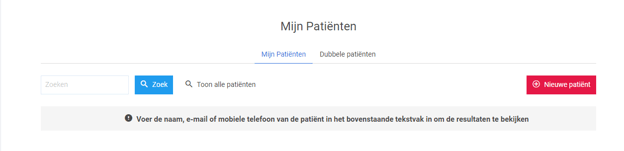
1. Ga naar de **Patiënten** rubriek
#### 
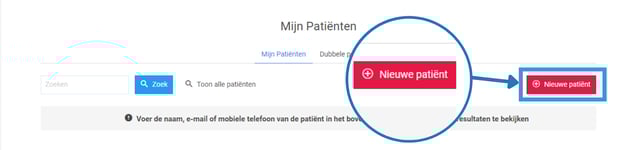
2. Klik op de knop **Nieuwe patiënt**.
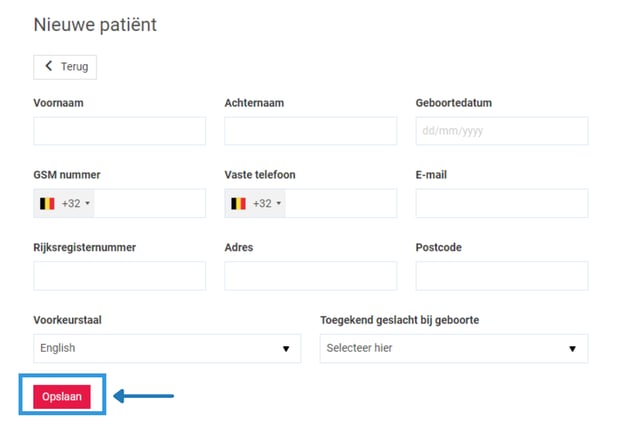
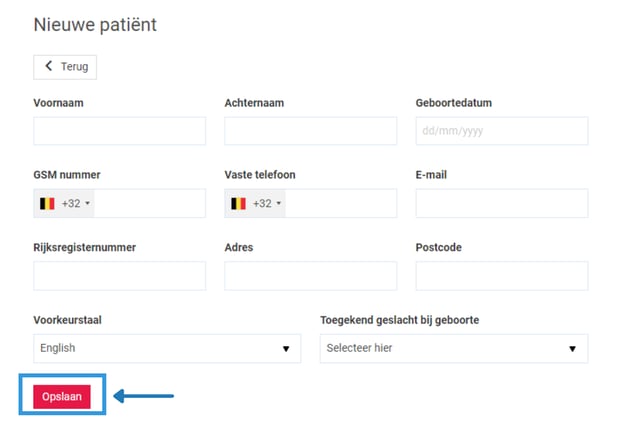
3. Vul de gevraagde gegevens in en sla op. Hierna kunt u de gegevens van de patiënt nog altijd wijzigen.
#### Patiënt toevoegen vanuit de zoekbalk
1. Ga naar de **zoekbalk** van uw agenda.
2. Begin met typen, de optie **Maak een nieuwe patiënt aan** zal verschijnen. Klik hierop.
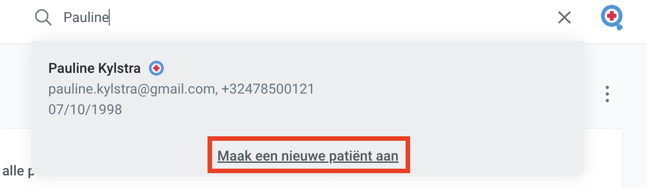
3. U wordt dan doorverwezen naar de pagina **Nieuwe patiënt** om alle informatie in te vullen. Vergeet niet **op te slaan** wanneer u klaar bent.
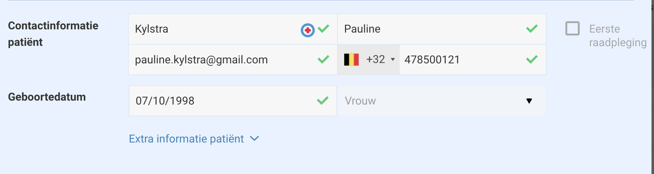
**Een patiënt toevoegen door een afspraak toe te voegen aan uw agenda**
Wanneer u een afspraak invoert, en de patiëntgegevens in het afspraakformulier invoert worden deze gegevens opgeslagen waardoor deze patiënt wordt toegevoegd in uw patiëntendatabase. Hetzelfde geldt voor afspraken die de patiënt online maakt.
- [Aan de slag gaan](https://pro.doctoranytime.doctor/nl-be/help-center/aan-de-slag-gaan?hsLang=nl-be)
- [Account](https://pro.doctoranytime.doctor/nl-be/help-center/account?hsLang=nl-be#main-content)
- [Account instellingen](https://pro.doctoranytime.doctor/nl-be/help-center/account?hsLang=nl-be#account-instellingen)
- [Gebruikers](https://pro.doctoranytime.doctor/nl-be/help-center/account?hsLang=nl-be#gebruikers)
- [Profiel](https://pro.doctoranytime.doctor/nl-be/help-center/profiel?hsLang=nl-be#main-content)
- [Diensten en behandelingen](https://pro.doctoranytime.doctor/nl-be/help-center/profiel?hsLang=nl-be#diensten-en-behandelingen)
- [Profiel promoten](https://pro.doctoranytime.doctor/nl-be/help-center/profiel?hsLang=nl-be#profiel-promoten)
- [Uw praktijk beheren](https://pro.doctoranytime.doctor/nl-be/help-center/uw-praktijk-beheren?hsLang=nl-be)
- [Beschikbaarheidsbeheer](https://pro.doctoranytime.doctor/nl-be/help-center/beschikbaarheidsbeheer?hsLang=nl-be)
- [Agenda](https://pro.doctoranytime.doctor/nl-be/help-center/agenda?hsLang=nl-be#main-content)
- [Instellingen](https://pro.doctoranytime.doctor/nl-be/help-center/agenda?hsLang=nl-be#instellingen)
- [Patiënten](https://pro.doctoranytime.doctor/nl-be/help-center/pati%C3%ABnten?hsLang=nl-be#main-content)
- [Database importeren](https://pro.doctoranytime.doctor/nl-be/help-center/pati%C3%ABnten?hsLang=nl-be#database-importeren)
- [Patiënten weigeren](https://pro.doctoranytime.doctor/nl-be/help-center/pati%C3%ABnten?hsLang=nl-be#pati%C3%ABnten-weigeren)
- [Beoordelingen](https://pro.doctoranytime.doctor/nl-be/help-center/pati%C3%ABnten?hsLang=nl-be#beoordelingen)
- [Communicatie met mijn patiënten](https://pro.doctoranytime.doctor/nl-be/help-center/pati%C3%ABnten?hsLang=nl-be#communicatie-met-mijn-pati%C3%ABnten)
- [Afspraken](https://pro.doctoranytime.doctor/nl-be/help-center/afspraken?hsLang=nl-be)
- [Videoconsultatie](https://pro.doctoranytime.doctor/nl-be/help-center/videoconsultatie?hsLang=nl-be#main-content)
- [Een nieuwe afspraak toevoegen](https://pro.doctoranytime.doctor/nl-be/help-center/videoconsultatie?hsLang=nl-be#een-nieuwe-afspraak-toevoegen)
- [Videoconsultatie voor medische centra](https://pro.doctoranytime.doctor/nl-be/help-center/videoconsultatie?hsLang=nl-be#videoconsultatie-voor-medische-centra)
- [Gegevensbeveiliging en informatiebeheer](https://pro.doctoranytime.doctor/nl-be/help-center/gegevensbeveiliging-en-informatiebeheer?hsLang=nl-be)
- [Vragen en Antwoorden](https://pro.doctoranytime.doctor/nl-be/help-center/vragen-en-antwoorden?hsLang=nl-be)
- [Online betalingen](https://pro.doctoranytime.doctor/nl-be/help-center/online-betalingen?hsLang=nl-be)
[.png?width=144&height=144&name=720x720gmail%20(1).png "doctoranytime")](http://www.doctoranytime.be)
[mailto:email@email.com](mailto:email@email.com)
Copyright © 2025, Doctoranytime