---
title: How to access the Reviews section
description: Doctoranytime Help Center
---
[Skip to content](https://pro.doctoranytime.doctor/help-center-en-be/help-center/how-to-access-the-reviews-section#main-content)
English - Belgium
Show submenu for translations

Open main navigation
Close main navigation
- English - Belgium
Show submenu for translations
- Contact us
Contact us
How can we help you?
- There are no suggestions because the search field is empty.
1. [Doctoranytime Help Center](https://pro.doctoranytime.doctor/help-center-en-be?hsLang=en-be)
2. [My Patients](https://pro.doctoranytime.doctor/help-center-en-be/my-patients?hsLang=en-be)
3. [Reviews](https://pro.doctoranytime.doctor/help-center-en-be/my-patients?hsLang=en-be#reviews)
- [Get started](https://pro.doctoranytime.doctor/help-center-en-be/get-started?hsLang=en-be)
- [Account En](https://pro.doctoranytime.doctor/help-center-en-be/account-en?hsLang=en-be#main-content)
- [Account Settings](https://pro.doctoranytime.doctor/help-center-en-be/account-en?hsLang=en-be#account-settings)
- [Users](https://pro.doctoranytime.doctor/help-center-en-be/account-en?hsLang=en-be#users)
- [Public profile](https://pro.doctoranytime.doctor/help-center-en-be/public-profile?hsLang=en-be#main-content)
- [Services and Treatments](https://pro.doctoranytime.doctor/help-center-en-be/public-profile?hsLang=en-be#services-and-treatments)
- [Promote Profile](https://pro.doctoranytime.doctor/help-center-en-be/public-profile?hsLang=en-be#promote-profile)
- [Practice Management](https://pro.doctoranytime.doctor/help-center-en-be/practice-management?hsLang=en-be#main-content)
- [Payment Methods](https://pro.doctoranytime.doctor/help-center-en-be/practice-management?hsLang=en-be#payment-methods)
- [Availability Management](https://pro.doctoranytime.doctor/help-center-en-be/availability-management?hsLang=en-be)
- [Agenda online](https://pro.doctoranytime.doctor/help-center-en-be/agenda-online?hsLang=en-be#main-content)
- [Agenda Settings](https://pro.doctoranytime.doctor/help-center-en-be/agenda-online?hsLang=en-be#agenda-settings)
- [My Patients](https://pro.doctoranytime.doctor/help-center-en-be/my-patients?hsLang=en-be#main-content)
- [Import database](https://pro.doctoranytime.doctor/help-center-en-be/my-patients?hsLang=en-be#import-database)
- [Patient restrictions](https://pro.doctoranytime.doctor/help-center-en-be/my-patients?hsLang=en-be#patient-restrictions)
- [Reviews](https://pro.doctoranytime.doctor/help-center-en-be/my-patients?hsLang=en-be#reviews)
- [Appointments](https://pro.doctoranytime.doctor/help-center-en-be/appointments?hsLang=en-be)
- [Video consultation](https://pro.doctoranytime.doctor/help-center-en-be/video-consultation?hsLang=en-be#main-content)
- [Adding a new appointment](https://pro.doctoranytime.doctor/help-center-en-be/video-consultation?hsLang=en-be#adding-a-new-appointment)
- [Video-Consultation for medical centers](https://pro.doctoranytime.doctor/help-center-en-be/video-consultation?hsLang=en-be#video-consultation-for-medical-centers)
- [Data Security and information management](https://pro.doctoranytime.doctor/help-center-en-be/data-security-and-information-management?hsLang=en-be)
- [Questions and Answers](https://pro.doctoranytime.doctor/help-center-en-be/questions-and-answers?hsLang=en-be)
# How to access the Reviews section
To access the reviews that your patients leave you after a consultation follow the steps below:
1. Go to the **User Menu** and click on** Reviews**.
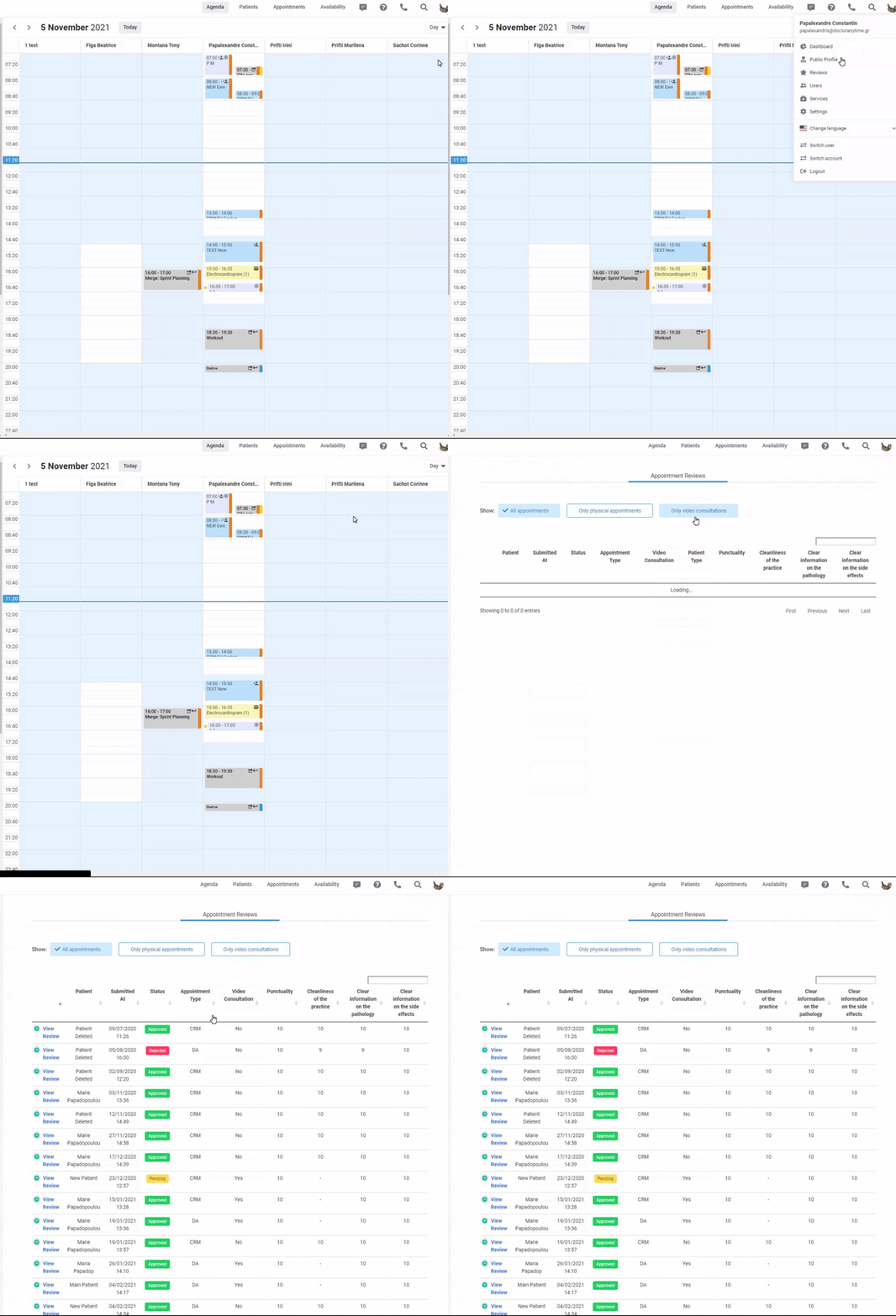
2. You will be directed to a page with two sections:
- - in the first section, called **Appointment reviews**, you can filter your appointments by all appointments, only face-to-face appointments or only Video Consultations. This way you’ll be able to make a more specific follow-up of your reviews.
- In the second section, called **Guest Reviews**, you will find the evaluations of the patients you invited.
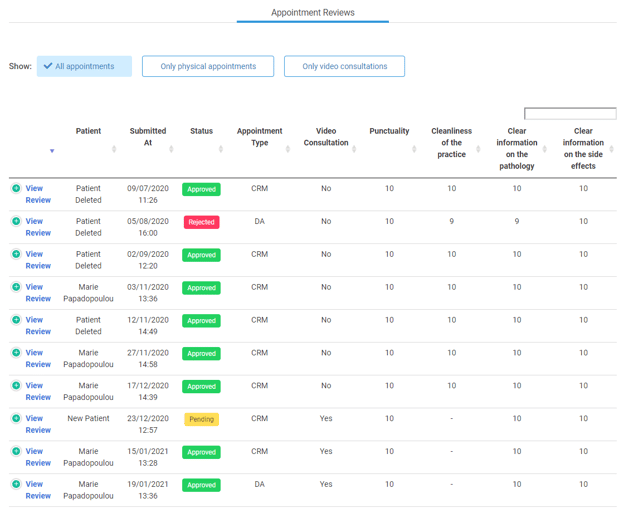
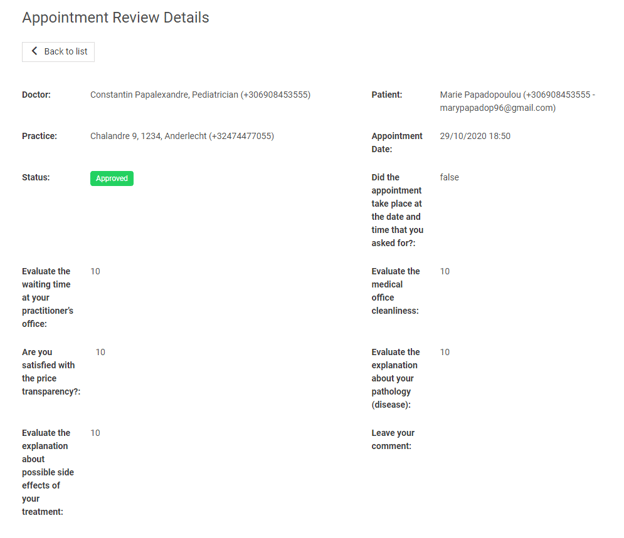
To see the details of a review click on **View review** and you will be able to find the patient's information, the series of questions they answered and the comments they left about you.
Do not hesitate to contact us for more information. Our team will gladly respond to all your questions!
[](https://pro.doctoranytime.doctor/?hsLang=en-be)
[mailto:email@email.com](mailto:email@email.com)
Copyright © 2025, Doctoranytime