---
title: Ouvrir un créneau horaire une semaine sur deux
description: Vous souhaitez proposer des rendez-vous à vos patients uniquement une semaine sur deux ?
---
[Passer au contenu](https://pro.doctoranytime.doctor/fr-be/help-center/ouvrir-un-creneau-horaire-une-semaine-sur-deux#main-content)
- [Français - Belgique](https://pro.doctoranytime.doctor/fr-be/help-center/ouvrir-un-creneau-horaire-une-semaine-sur-deux)
- [English - Belgium](https://pro.doctoranytime.doctor/en-be/help-center/open-a-time-slot-every-other-week)
- [Nederlands - België](https://pro.doctoranytime.doctor/nl-be/help-center/een-tijdslot-om-de-twee-weken-openen)
Français - Belgique
Afficher le sous-menu pour les traductions
[](https://www.doctoranytime.be/)
Ouvrir la navigation principale
Fermer la navigation principale
- - [Français - Belgique](https://pro.doctoranytime.doctor/fr-be/help-center/ouvrir-un-creneau-horaire-une-semaine-sur-deux)
- [English - Belgium](https://pro.doctoranytime.doctor/en-be/help-center/open-a-time-slot-every-other-week)
- [Nederlands - België](https://pro.doctoranytime.doctor/nl-be/help-center/een-tijdslot-om-de-twee-weken-openen)
Français - Belgique
Afficher le sous-menu pour les traductions
- [Contact](https://pro.doctoranytime.be/fr/contactus)
[Contact](https://pro.doctoranytime.be/fr/contactus?hsLang=fr-be)
Comment pouvons-nous vous aider ?
- Il n'y a aucune suggestion car le champ de recherche est vide.
1. [Doctoranytime Help Center](https://pro.doctoranytime.doctor/fr-be/help-center?hsLang=fr-be)
2. [Gérer mon agenda](https://pro.doctoranytime.doctor/fr-be/help-center/g%C3%A9rer-mon-agenda?hsLang=fr-be)
3. [Disponibilités](https://pro.doctoranytime.doctor/fr-be/help-center/g%C3%A9rer-mon-agenda?hsLang=fr-be#disponibilit%C3%A9s)
# Ouvrir un créneau horaire une semaine sur deux
Vous souhaitez proposer des rendez-vous à vos patients uniquement une semaine sur deux ? Voici comment configurer votre agenda Doctoranytime pour alterner automatiquement vos semaines de disponibilité.
1. Configurer votre plage horaire habituelle
Dans un premier temps, vous devez créer votre plage horaire dans l'onglet **« Disponibilités »**, comme pour un horaire hebdomadaire classique.
Pour connaître les étapes à suivre, consultez notre article **« [Comment ouvrir un créneau horaire dans mon agenda Doctoranytime ?](https://pro.doctoranytime.doctor/fr-be/help-center/ouvrir-un-creneau-horaire?hsLang=fr-be) »**.
Une fois votre plage horaire enregistrée, celle-ci sera proposée chaque semaine par défaut.
1. Bloquer les créneaux une semaine sur deux
Pour que vos disponibilités soient proposées uniquement une semaine sur deux, vous devez ensuite créer une indisponibilité récurrente.
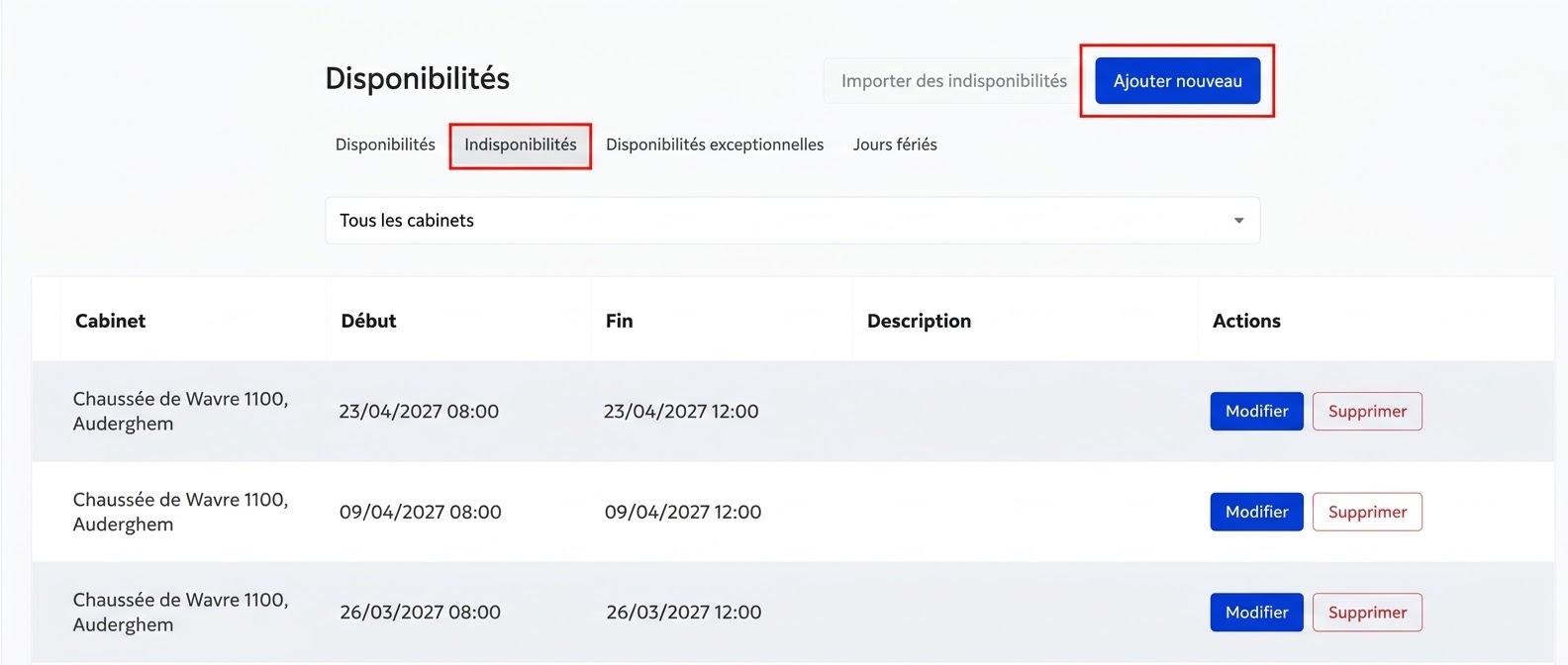
1. Rendez-vous dans l'onglet **« Disponibilités »** de votre agenda.
2. Cliquez sur le bouton **« Indisponibilités »**, situé juste au-dessus de l'adresse de votre cabinet.
3. Cliquez sur **« Ajouter nouveau »**.
4. Dans le champ **« Date de début »**, indiquez la première date à laquelle vous ne souhaitez pas travailler, ainsi que l'heure de début de votre indisponibilité.
5. Dans le champ **« Date de fin »**, indiquez la date et l'heure de fin de votre créneaux (le même jour).
Veillez à bien sélectionner les horaires correspondant à la plage que vous souhaitez bloquer.
Une fois les dates et les heures renseignées :
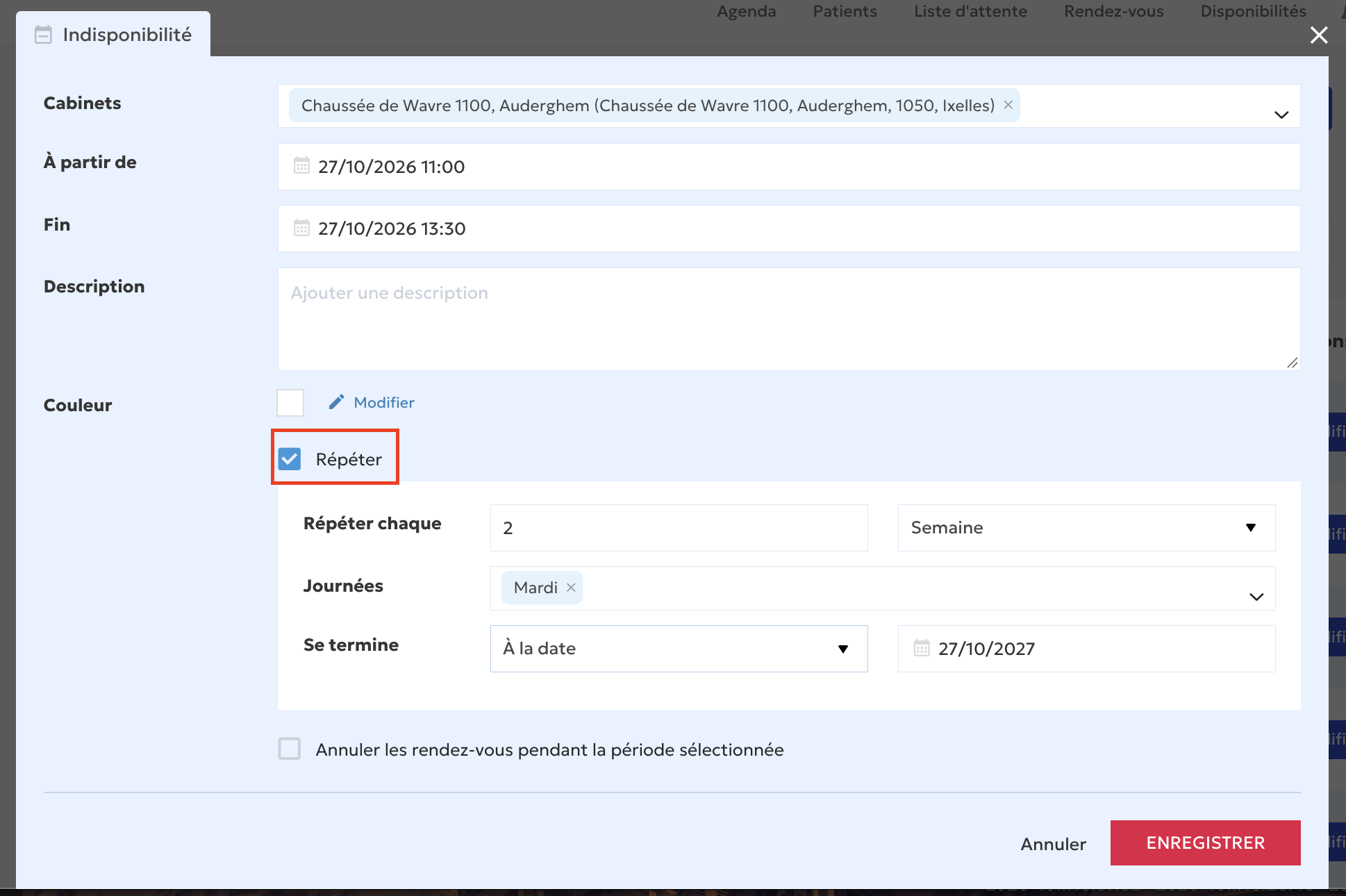
1. Cliquez sur le bouton **« Répéter »**.
2. Sélectionnez l'option **« Répéter toutes les deux semaines »**.
3. Définissez quand cette répétition doit se terminer. Vous pouvez choisir :
- Une **date de fin** précise.
- Un **nombre de répétitions** après lequel l'indisponibilité prendra fin.
1. Cliquez sur **« Enregistrer »**.
Votre indisponibilité sera alors automatiquement répétée toutes les deux semaines.
Une fois votre indisponibilité enregistrée, retournez dans votre agenda et vérifiez les semaines suivantes.
- [Pour commencer](https://pro.doctoranytime.doctor/fr-be/help-center/pour-commencer?hsLang=fr-be)
- [Compte et abonnement](https://pro.doctoranytime.doctor/fr-be/help-center/compte-et-abonnement?hsLang=fr-be#main-content)
- [Compte](https://pro.doctoranytime.doctor/fr-be/help-center/compte-et-abonnement?hsLang=fr-be#compte)
- [Abonnement](https://pro.doctoranytime.doctor/fr-be/help-center/compte-et-abonnement?hsLang=fr-be#abonnement)
- [Profil et visibilité](https://pro.doctoranytime.doctor/fr-be/help-center/profil-et-visibilit%C3%A9?hsLang=fr-be#main-content)
- [Profil en ligne](https://pro.doctoranytime.doctor/fr-be/help-center/profil-et-visibilit%C3%A9?hsLang=fr-be#profil-en-ligne)
- [Visibilité](https://pro.doctoranytime.doctor/fr-be/help-center/profil-et-visibilit%C3%A9?hsLang=fr-be#visibilit%C3%A9)
- [Cabinets](https://pro.doctoranytime.doctor/fr-be/help-center/profil-et-visibilit%C3%A9?hsLang=fr-be#cabinets)
- [Gérer mes types de consultations](https://pro.doctoranytime.doctor/fr-be/help-center/g%C3%A9rer-mes-types-de-consultations?hsLang=fr-be)
- [Gérer mon agenda](https://pro.doctoranytime.doctor/fr-be/help-center/g%C3%A9rer-mon-agenda?hsLang=fr-be#main-content)
- [Disponibilités](https://pro.doctoranytime.doctor/fr-be/help-center/g%C3%A9rer-mon-agenda?hsLang=fr-be#disponibilit%C3%A9s)
- [Rendez-vous](https://pro.doctoranytime.doctor/fr-be/help-center/g%C3%A9rer-mon-agenda?hsLang=fr-be#rendez-vous)
- [SMS](https://pro.doctoranytime.doctor/fr-be/help-center/g%C3%A9rer-mon-agenda?hsLang=fr-be#sms)
- [Tâches](https://pro.doctoranytime.doctor/fr-be/help-center/g%C3%A9rer-mon-agenda?hsLang=fr-be#t%C3%A2ches)
- [Affichage de l'agenda](https://pro.doctoranytime.doctor/fr-be/help-center/g%C3%A9rer-mon-agenda?hsLang=fr-be#affichage-de-lagenda)
- [Synchroniser l'agenda](https://pro.doctoranytime.doctor/fr-be/help-center/g%C3%A9rer-mon-agenda?hsLang=fr-be#synchroniser-lagenda)
- [Utilisateurs](https://pro.doctoranytime.doctor/fr-be/help-center/g%C3%A9rer-mon-agenda?hsLang=fr-be#utilisateurs)
- [Gérer mes patients](https://pro.doctoranytime.doctor/fr-be/help-center/g%C3%A9rer-mes-patients?hsLang=fr-be#main-content)
- [Patients](https://pro.doctoranytime.doctor/fr-be/help-center/g%C3%A9rer-mes-patients?hsLang=fr-be#patients)
- [Paiement](https://pro.doctoranytime.doctor/fr-be/help-center/paiement?hsLang=fr-be)
- [Vidéo-consultation](https://pro.doctoranytime.doctor/fr-be/help-center/vid%C3%A9o-consultation?hsLang=fr-be)
- [Sécurité des données](https://pro.doctoranytime.doctor/fr-be/help-center/s%C3%A9curit%C3%A9-des-donn%C3%A9es?hsLang=fr-be)
- [Centres médicaux](https://pro.doctoranytime.doctor/fr-be/help-center/centres-m%C3%A9dicaux?hsLang=fr-be)
[](http://www.doctoranytime.be)
[mailto:email@email.com](mailto:email@email.com)
Copyright © 2025, Doctoranytime