---
title: Jours fériés
description: Doctoranytime Help Center
---
[Passer au contenu](https://pro.doctoranytime.doctor/fr-be/help-center/jours-fériés#main-content)
- [Français - Belgique](https://pro.doctoranytime.doctor/fr-be/help-center/jours-f%C3%A9ri%C3%A9s)
- [English - Belgium](https://pro.doctoranytime.doctor/en-be/help-center/help-center/holidays)
- [Nederlands - België](https://pro.doctoranytime.doctor/nl-be/help-center/vakantie)
Français - Belgique
Afficher le sous-menu pour les traductions
[](https://www.doctoranytime.be/)
Ouvrir la navigation principale
Fermer la navigation principale
- - [Français - Belgique](https://pro.doctoranytime.doctor/fr-be/help-center/jours-f%C3%A9ri%C3%A9s)
- [English - Belgium](https://pro.doctoranytime.doctor/en-be/help-center/help-center/holidays)
- [Nederlands - België](https://pro.doctoranytime.doctor/nl-be/help-center/vakantie)
Français - Belgique
Afficher le sous-menu pour les traductions
- [Contact](https://pro.doctoranytime.be/fr/contactus)
[Contact](https://pro.doctoranytime.be/fr/contactus?hsLang=fr-be)
Comment pouvons-nous vous aider ?
- Il n'y a aucune suggestion car le champ de recherche est vide.
1. [Doctoranytime Help Center](https://pro.doctoranytime.doctor/fr-be/help-center?hsLang=fr-be)
2. [Gestion des disponibilités](https://pro.doctoranytime.doctor/fr-be/help-center/gestion-des-disponibilit%C3%A9s?hsLang=fr-be)
# Jours fériés
## Par défaut, les jours fériés sont bloqués par des indisponibilités.
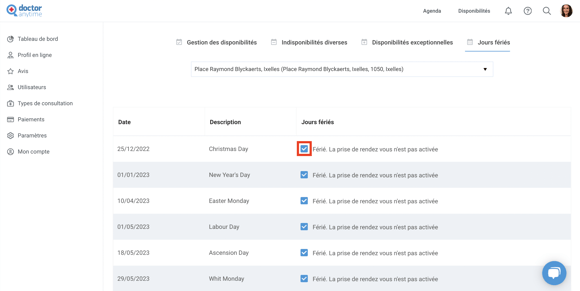
Cependant, vous pouvez les rendre accessibles dans votre agenda si vous souhaitez proposer des consultations à ces dates.
Pour accéder aux **Jours Fériés** :
1. Cliquez sur **Disponibilités**
2. Accédez à l'onglet **Jours fériés**
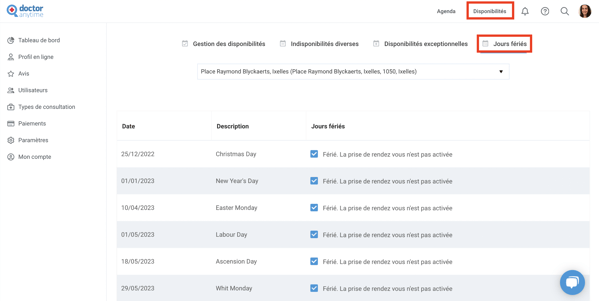
1. Sélectionnez le **Cabinet** dans le **menu déroulant**
2. Cliquez sur la **case du jour férié** que vous souhaitez rendre accessible dans votre agenda
- [Pour commencer](https://pro.doctoranytime.doctor/fr-be/help-center/pour-commencer?hsLang=fr-be)
- [Compte](https://pro.doctoranytime.doctor/fr-be/help-center/compte?hsLang=fr-be#main-content)
- [Paramètres du compte](https://pro.doctoranytime.doctor/fr-be/help-center/compte?hsLang=fr-be#param%C3%A8tres-du-compte)
- [Utilisateurs](https://pro.doctoranytime.doctor/fr-be/help-center/compte?hsLang=fr-be#utilisateurs)
- [Profil en ligne](https://pro.doctoranytime.doctor/fr-be/help-center/profil-en-ligne?hsLang=fr-be#main-content)
- [Services et traitements](https://pro.doctoranytime.doctor/fr-be/help-center/profil-en-ligne?hsLang=fr-be#services-et-traitements)
- [Promouvoir votre profil](https://pro.doctoranytime.doctor/fr-be/help-center/profil-en-ligne?hsLang=fr-be#promouvoir-votre-profil)
- [Gestion de votre cabinet](https://pro.doctoranytime.doctor/fr-be/help-center/gestion-de-votre-cabinet?hsLang=fr-be)
- [Gestion des disponibilités](https://pro.doctoranytime.doctor/fr-be/help-center/gestion-des-disponibilit%C3%A9s?hsLang=fr-be)
- [Agenda](https://pro.doctoranytime.doctor/fr-be/help-center/agenda?hsLang=fr-be#main-content)
- [Paramètres](https://pro.doctoranytime.doctor/fr-be/help-center/agenda?hsLang=fr-be#param%C3%A8tres)
- [Mes Patients](https://pro.doctoranytime.doctor/fr-be/help-center/mes-patients?hsLang=fr-be#main-content)
- [Importer la base de données](https://pro.doctoranytime.doctor/fr-be/help-center/mes-patients?hsLang=fr-be#importer-la-base-de-donn%C3%A9es)
- [Restrictions relatives aux patients](https://pro.doctoranytime.doctor/fr-be/help-center/mes-patients?hsLang=fr-be#restrictions-relatives-aux-patients)
- [Avis](https://pro.doctoranytime.doctor/fr-be/help-center/mes-patients?hsLang=fr-be#avis)
- [Communiquer avec mes patients](https://pro.doctoranytime.doctor/fr-be/help-center/mes-patients?hsLang=fr-be#communiquer-avec-mes-patients)
- [Les rendez-vous](https://pro.doctoranytime.doctor/fr-be/help-center/les-rendez-vous?hsLang=fr-be)
- [Vidéo Consultation](https://pro.doctoranytime.doctor/fr-be/help-center/vid%C3%A9o-consultation?hsLang=fr-be#main-content)
- [Ajouter un nouveau rendez-vous](https://pro.doctoranytime.doctor/fr-be/help-center/vid%C3%A9o-consultation?hsLang=fr-be#ajouter-un-nouveau-rendez-vous)
- [Video Consultation pour les centres médicaux](https://pro.doctoranytime.doctor/fr-be/help-center/vid%C3%A9o-consultation?hsLang=fr-be#video-consultation-pour-les-centres-m%C3%A9dicaux)
- [Sécurité des données et gestion des informations](https://pro.doctoranytime.doctor/fr-be/help-center/s%C3%A9curit%C3%A9-des-donn%C3%A9es-et-gestion-des-informations?hsLang=fr-be)
- [Questions et Réponses](https://pro.doctoranytime.doctor/fr-be/help-center/questions-et-r%C3%A9ponses?hsLang=fr-be)
- [Paiement en ligne](https://pro.doctoranytime.doctor/fr-be/help-center/paiement-en-ligne?hsLang=fr-be)
[.png?width=144&height=144&name=720x720gmail%20(1).png "doctoranytime")](http://www.doctoranytime.be)
[mailto:email@email.com](mailto:email@email.com)
Copyright © 2025, Doctoranytime