---
title: Fusionner les patients
description: Vous pouvez fusionner les dossiers des patients afin d’éviter les doublons.
---
[Passer au contenu](https://pro.doctoranytime.doctor/fr-be/help-center/fusionner-les-patients#main-content)
- [Français - Belgique](https://pro.doctoranytime.doctor/fr-be/help-center/fusionner-les-patients)
- [English - Belgium](https://pro.doctoranytime.doctor/en-be/help-center/help-center/merge-patients)
- [Nederlands - België](https://pro.doctoranytime.doctor/nl-be/help-center/patienten-samenvoegen)
Français - Belgique
Afficher le sous-menu pour les traductions
[](https://www.doctoranytime.be/)
Ouvrir la navigation principale
Fermer la navigation principale
- - [Français - Belgique](https://pro.doctoranytime.doctor/fr-be/help-center/fusionner-les-patients)
- [English - Belgium](https://pro.doctoranytime.doctor/en-be/help-center/help-center/merge-patients)
- [Nederlands - België](https://pro.doctoranytime.doctor/nl-be/help-center/patienten-samenvoegen)
Français - Belgique
Afficher le sous-menu pour les traductions
- [Contact](https://pro.doctoranytime.be/fr/contactus)
[Contact](https://pro.doctoranytime.be/fr/contactus?hsLang=fr-be)
Comment pouvons-nous vous aider ?
- Il n'y a aucune suggestion car le champ de recherche est vide.
1. [Doctoranytime Help Center](https://pro.doctoranytime.doctor/fr-be/help-center?hsLang=fr-be)
2. [Mes Patients](https://pro.doctoranytime.doctor/fr-be/help-center/mes-patients?hsLang=fr-be)
# Fusionner les patients
## Vous pouvez fusionner les dossiers des patients afin d’éviter les doublons.
Un patient peut avoir plusieurs dossiers, car il peut avoir deux adresses e-mail ou encore deux numéros de téléphone différents.
Voici les étapes à suivre pour fusionner les patients :
1. Accédez à la section **Patients** en haut à droite du tableau de bord principal.
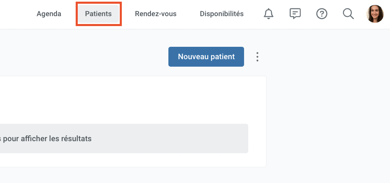
2. Vous serez dirigé vers la section **Mes patients**. Vous pouvez cliquer sur les **trois petits points** à côté de Nouveau patient, et sélectionner **Patients en double**.
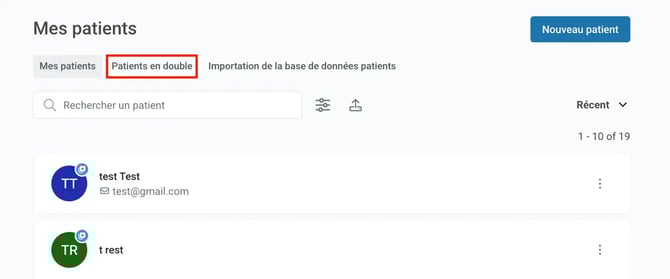
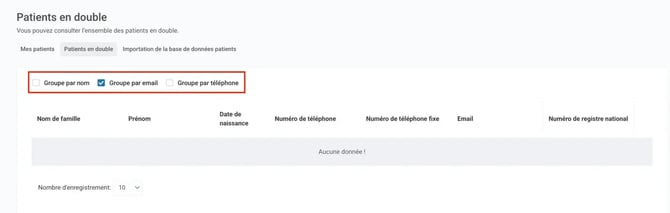
3. Vous pouvez ensuite filtrer les patients par :
- - Nom : patients portant le même nom.
- E-mail : patients ayant la même adresse e-mail.
- Téléphone : patients ayant le même numéro de téléphone portable.
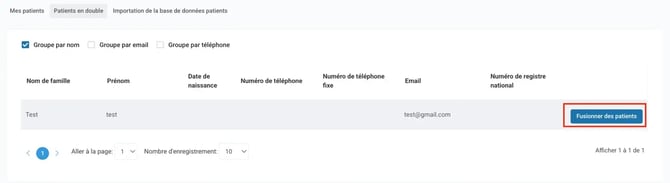
4. Cliquez sur **Fusionner des patients** sur la ligne du patient dont vous souhaitez fusionner les informations.
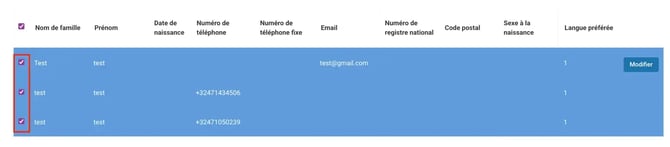
5. Attendez un moment et une nouvelle fenêtre s’ouvrira montrant une liste de patients correspondant au même filtre. Sélectionnez les patients que vous souhaitez fusionner en cochant leurs cases.
6. Cliquez sur **Fusionner les patients sélectionnés** pour finaliser l’action.
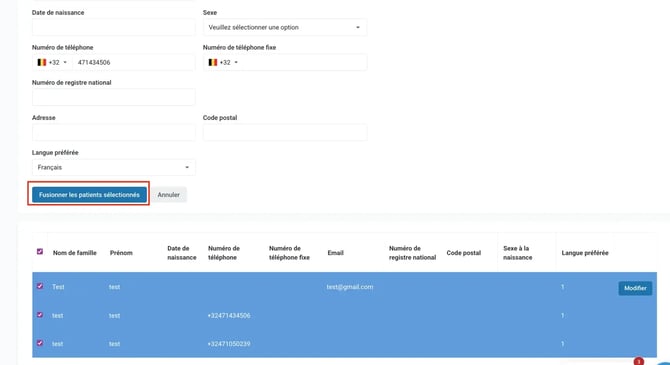
7. Le dossier du patient sélectionné est maintenant complet. Vous pouvez toujours revenir pour le modifier ou pour créer un nouveau rendez-vous pour ce patient.
- [Pour commencer](https://pro.doctoranytime.doctor/fr-be/help-center/pour-commencer?hsLang=fr-be)
- [Compte](https://pro.doctoranytime.doctor/fr-be/help-center/compte?hsLang=fr-be#main-content)
- [Paramètres du compte](https://pro.doctoranytime.doctor/fr-be/help-center/compte?hsLang=fr-be#param%C3%A8tres-du-compte)
- [Utilisateurs](https://pro.doctoranytime.doctor/fr-be/help-center/compte?hsLang=fr-be#utilisateurs)
- [Profil en ligne](https://pro.doctoranytime.doctor/fr-be/help-center/profil-en-ligne?hsLang=fr-be#main-content)
- [Services et traitements](https://pro.doctoranytime.doctor/fr-be/help-center/profil-en-ligne?hsLang=fr-be#services-et-traitements)
- [Promouvoir votre profil](https://pro.doctoranytime.doctor/fr-be/help-center/profil-en-ligne?hsLang=fr-be#promouvoir-votre-profil)
- [Gestion de votre cabinet](https://pro.doctoranytime.doctor/fr-be/help-center/gestion-de-votre-cabinet?hsLang=fr-be)
- [Gestion des disponibilités](https://pro.doctoranytime.doctor/fr-be/help-center/gestion-des-disponibilit%C3%A9s?hsLang=fr-be)
- [Agenda](https://pro.doctoranytime.doctor/fr-be/help-center/agenda?hsLang=fr-be#main-content)
- [Paramètres](https://pro.doctoranytime.doctor/fr-be/help-center/agenda?hsLang=fr-be#param%C3%A8tres)
- [Mes Patients](https://pro.doctoranytime.doctor/fr-be/help-center/mes-patients?hsLang=fr-be#main-content)
- [Importer la base de données](https://pro.doctoranytime.doctor/fr-be/help-center/mes-patients?hsLang=fr-be#importer-la-base-de-donn%C3%A9es)
- [Restrictions relatives aux patients](https://pro.doctoranytime.doctor/fr-be/help-center/mes-patients?hsLang=fr-be#restrictions-relatives-aux-patients)
- [Avis](https://pro.doctoranytime.doctor/fr-be/help-center/mes-patients?hsLang=fr-be#avis)
- [Communiquer avec mes patients](https://pro.doctoranytime.doctor/fr-be/help-center/mes-patients?hsLang=fr-be#communiquer-avec-mes-patients)
- [Les rendez-vous](https://pro.doctoranytime.doctor/fr-be/help-center/les-rendez-vous?hsLang=fr-be)
- [Vidéo Consultation](https://pro.doctoranytime.doctor/fr-be/help-center/vid%C3%A9o-consultation?hsLang=fr-be#main-content)
- [Ajouter un nouveau rendez-vous](https://pro.doctoranytime.doctor/fr-be/help-center/vid%C3%A9o-consultation?hsLang=fr-be#ajouter-un-nouveau-rendez-vous)
- [Video Consultation pour les centres médicaux](https://pro.doctoranytime.doctor/fr-be/help-center/vid%C3%A9o-consultation?hsLang=fr-be#video-consultation-pour-les-centres-m%C3%A9dicaux)
- [Sécurité des données et gestion des informations](https://pro.doctoranytime.doctor/fr-be/help-center/s%C3%A9curit%C3%A9-des-donn%C3%A9es-et-gestion-des-informations?hsLang=fr-be)
- [Questions et Réponses](https://pro.doctoranytime.doctor/fr-be/help-center/questions-et-r%C3%A9ponses?hsLang=fr-be)
- [Paiement en ligne](https://pro.doctoranytime.doctor/fr-be/help-center/paiement-en-ligne?hsLang=fr-be)
[.png?width=144&height=144&name=720x720gmail%20(1).png "doctoranytime")](http://www.doctoranytime.be)
[mailto:email@email.com](mailto:email@email.com)
Copyright © 2025, Doctoranytime