---
title: Consulter l'historique des paiements (reçu)
description: L'historique de vos paiements se trouve dans l'onglet Paiement en ligne.
---
[Passer au contenu](https://pro.doctoranytime.doctor/fr-be/help-center/consulter-l-historique-des-paiements-recu#main-content)
- [Français - Belgique](https://pro.doctoranytime.doctor/fr-be/help-center/consulter-l-historique-des-paiements-recu)
- [English - Belgium](https://pro.doctoranytime.doctor/en-be/help-center/view-payment-history-receipt)
- [Nederlands - België](https://pro.doctoranytime.doctor/nl-be/help-center/betalingsgeschiedenis-bekijken-betalingsbewijs)
Français - Belgique
Afficher le sous-menu pour les traductions
[](https://www.doctoranytime.be/)
Ouvrir la navigation principale
Fermer la navigation principale
- - [Français - Belgique](https://pro.doctoranytime.doctor/fr-be/help-center/consulter-l-historique-des-paiements-recu)
- [English - Belgium](https://pro.doctoranytime.doctor/en-be/help-center/view-payment-history-receipt)
- [Nederlands - België](https://pro.doctoranytime.doctor/nl-be/help-center/betalingsgeschiedenis-bekijken-betalingsbewijs)
Français - Belgique
Afficher le sous-menu pour les traductions
- [Contact](https://pro.doctoranytime.be/fr/contactus)
[Contact](https://pro.doctoranytime.be/fr/contactus?hsLang=fr-be)
Comment pouvons-nous vous aider ?
- Il n'y a aucune suggestion car le champ de recherche est vide.
1. [Doctoranytime Help Center](https://pro.doctoranytime.doctor/fr-be/help-center?hsLang=fr-be)
2. [Paiement](https://pro.doctoranytime.doctor/fr-be/help-center/paiement?hsLang=fr-be)
# Consulter l'historique des paiements (reçu)
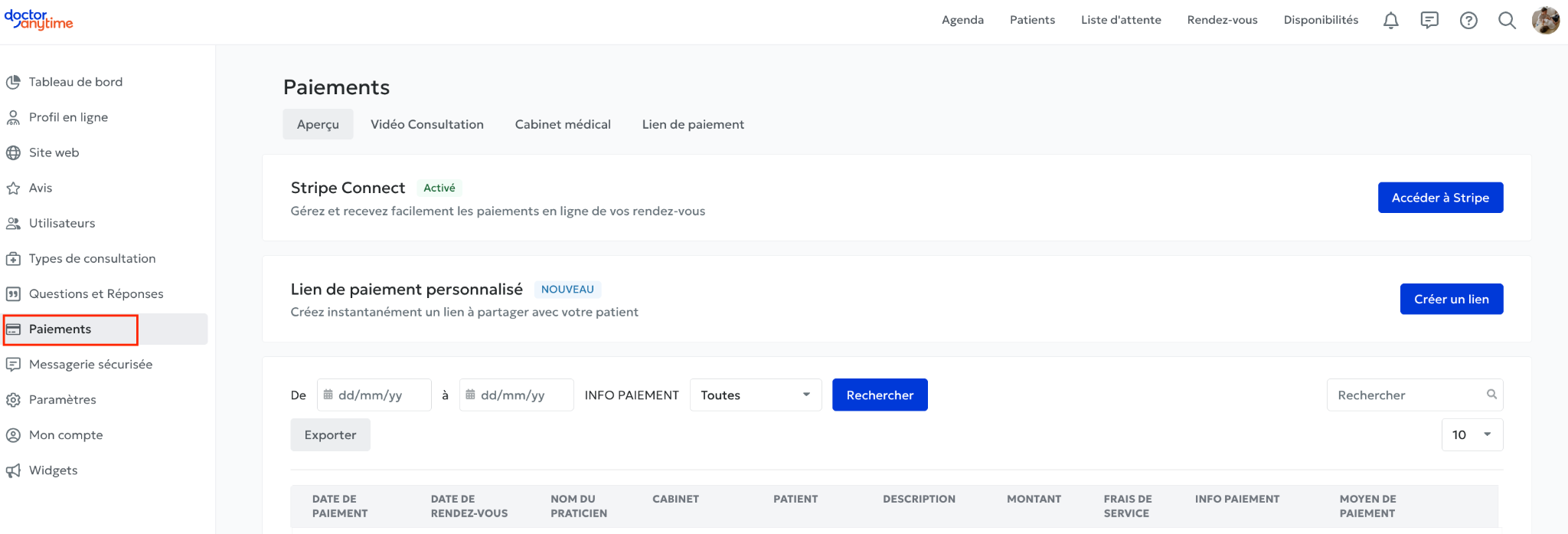
L'historique de vos paiements se trouve dans l'onglet **Paiement en ligne**.
Vous y retrouvez un tableau reprenant, pour chaque paiement :
- Le **nom du patient**
- Le **montant**
- La **date de paiement**
## Reçu
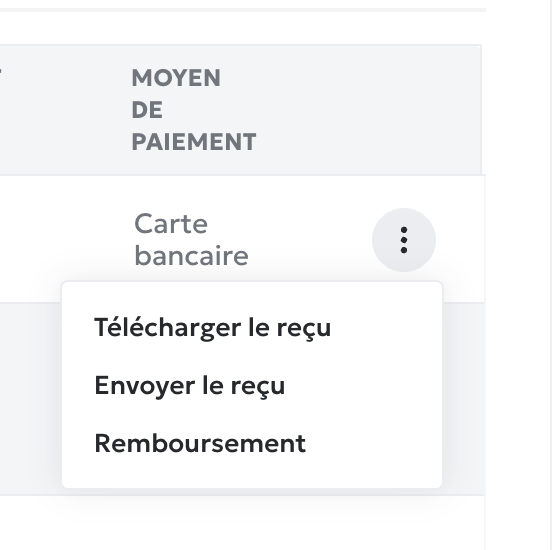
De votre côté, vous avez la possibilité de télécharger le reçu du patient ou bien de lui envoyer directement. Il suffit de se rendre dans l’onglet Paiement et de cliquer sur les trois petits points :
## Reçu pour remboursement mutuelle
Si le patient souhaite obtenir un reçu spécifique pour se faire rembourser par sa mutuelle, c'est à vous de le lui fournir.
- [Pour commencer](https://pro.doctoranytime.doctor/fr-be/help-center/pour-commencer?hsLang=fr-be)
- [Compte et abonnement](https://pro.doctoranytime.doctor/fr-be/help-center/compte-et-abonnement?hsLang=fr-be#main-content)
- [Compte](https://pro.doctoranytime.doctor/fr-be/help-center/compte-et-abonnement?hsLang=fr-be#compte)
- [Abonnement](https://pro.doctoranytime.doctor/fr-be/help-center/compte-et-abonnement?hsLang=fr-be#abonnement)
- [Profil et visibilité](https://pro.doctoranytime.doctor/fr-be/help-center/profil-et-visibilit%C3%A9?hsLang=fr-be#main-content)
- [Profil en ligne](https://pro.doctoranytime.doctor/fr-be/help-center/profil-et-visibilit%C3%A9?hsLang=fr-be#profil-en-ligne)
- [Visibilité](https://pro.doctoranytime.doctor/fr-be/help-center/profil-et-visibilit%C3%A9?hsLang=fr-be#visibilit%C3%A9)
- [Cabinets](https://pro.doctoranytime.doctor/fr-be/help-center/profil-et-visibilit%C3%A9?hsLang=fr-be#cabinets)
- [Gérer mes types de consultations](https://pro.doctoranytime.doctor/fr-be/help-center/g%C3%A9rer-mes-types-de-consultations?hsLang=fr-be)
- [Gérer mon agenda](https://pro.doctoranytime.doctor/fr-be/help-center/g%C3%A9rer-mon-agenda?hsLang=fr-be#main-content)
- [Disponibilités](https://pro.doctoranytime.doctor/fr-be/help-center/g%C3%A9rer-mon-agenda?hsLang=fr-be#disponibilit%C3%A9s)
- [Rendez-vous](https://pro.doctoranytime.doctor/fr-be/help-center/g%C3%A9rer-mon-agenda?hsLang=fr-be#rendez-vous)
- [SMS](https://pro.doctoranytime.doctor/fr-be/help-center/g%C3%A9rer-mon-agenda?hsLang=fr-be#sms)
- [Tâches](https://pro.doctoranytime.doctor/fr-be/help-center/g%C3%A9rer-mon-agenda?hsLang=fr-be#t%C3%A2ches)
- [Affichage de l'agenda](https://pro.doctoranytime.doctor/fr-be/help-center/g%C3%A9rer-mon-agenda?hsLang=fr-be#affichage-de-lagenda)
- [Synchroniser l'agenda](https://pro.doctoranytime.doctor/fr-be/help-center/g%C3%A9rer-mon-agenda?hsLang=fr-be#synchroniser-lagenda)
- [Utilisateurs](https://pro.doctoranytime.doctor/fr-be/help-center/g%C3%A9rer-mon-agenda?hsLang=fr-be#utilisateurs)
- [Gérer mes patients](https://pro.doctoranytime.doctor/fr-be/help-center/g%C3%A9rer-mes-patients?hsLang=fr-be#main-content)
- [Patients](https://pro.doctoranytime.doctor/fr-be/help-center/g%C3%A9rer-mes-patients?hsLang=fr-be#patients)
- [Paiement](https://pro.doctoranytime.doctor/fr-be/help-center/paiement?hsLang=fr-be)
- [Vidéo-consultation](https://pro.doctoranytime.doctor/fr-be/help-center/vid%C3%A9o-consultation?hsLang=fr-be)
- [Sécurité des données](https://pro.doctoranytime.doctor/fr-be/help-center/s%C3%A9curit%C3%A9-des-donn%C3%A9es?hsLang=fr-be)
- [Centres médicaux](https://pro.doctoranytime.doctor/fr-be/help-center/centres-m%C3%A9dicaux?hsLang=fr-be)
[](http://www.doctoranytime.be)
[mailto:email@email.com](mailto:email@email.com)
Copyright © 2025, Doctoranytime