---
title: Comment se connecter à mon compte ?
description: Connexion au compte praticien Doctoranytime sur ordinateur, navigateur mobile ou application.
---
[Passer au contenu](https://pro.doctoranytime.doctor/fr-be/help-center/comment-se-connecter-a-mon-compte#main-content)
- [Français - Belgique](https://pro.doctoranytime.doctor/fr-be/help-center/comment-se-connecter-a-mon-compte)
- [English - Belgium](https://pro.doctoranytime.doctor/en-be/help-center/how-do-i-log-in-to-my-account)
- [Nederlands - België](https://pro.doctoranytime.doctor/nl-be/help-center/hoe-meld-ik-me-aan-bij-mijn-account)
Français - Belgique
Afficher le sous-menu pour les traductions
[](https://www.doctoranytime.be/)
Ouvrir la navigation principale
Fermer la navigation principale
- - [Français - Belgique](https://pro.doctoranytime.doctor/fr-be/help-center/comment-se-connecter-a-mon-compte)
- [English - Belgium](https://pro.doctoranytime.doctor/en-be/help-center/how-do-i-log-in-to-my-account)
- [Nederlands - België](https://pro.doctoranytime.doctor/nl-be/help-center/hoe-meld-ik-me-aan-bij-mijn-account)
Français - Belgique
Afficher le sous-menu pour les traductions
- [Contact](https://pro.doctoranytime.be/fr/contactus)
[Contact](https://pro.doctoranytime.be/fr/contactus?hsLang=fr-be)
Comment pouvons-nous vous aider ?
- Il n'y a aucune suggestion car le champ de recherche est vide.
1. [Doctoranytime Help Center](https://pro.doctoranytime.doctor/fr-be/help-center?hsLang=fr-be)
2. [Pour commencer](https://pro.doctoranytime.doctor/fr-be/help-center/pour-commencer?hsLang=fr-be)
# Comment se connecter à mon compte ?
## Sur ordinateur ou le navigateur de votre téléphone
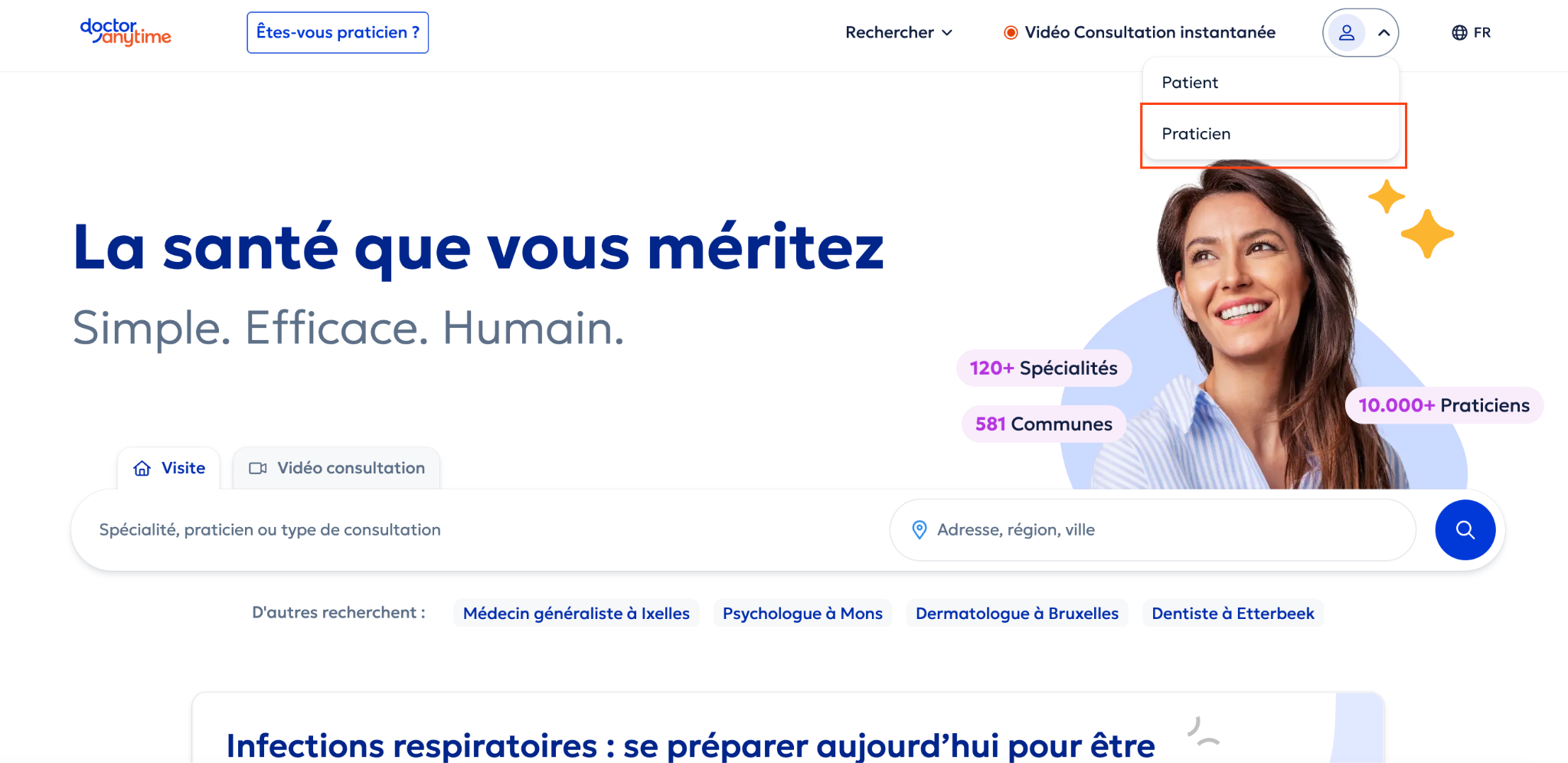
- Rendez-vous sur [doctoranytime.be](http://doctoranytime.be)
- Cliquez sur l’icône de connexion en haut à droite, et sélectionnez “Praticien”
- Connectez-vous avec votre **nom d’utilisateur** et mot de passe
## Sur l’application
Si votre abonnement comprend un accès à l’application mobile Doctoranytime Agenda, vous pouvez également vous connecter via l’application pour les praticiens afin de consulter votre agenda et gérer vos rendez-vous.
Attention, **votre nom d’utilisateur n’est pas votre adresse email**. Il s’agit du nom d’utilisateur que vous avez choisi au moment de la création de votre compte. Si vous ne vous en souvenez plus, vous pouvez contacter votre account manager sur [care@doctoranytime.be](mailto:care@doctoranytime.be) afin qu’un nouveau lien d’activation vous sera envoyé. Vous pourrez alors choisir un nouveau nom d’utilisateur et mot de passe.
- [Pour commencer](https://pro.doctoranytime.doctor/fr-be/help-center/pour-commencer?hsLang=fr-be)
- [Compte et abonnement](https://pro.doctoranytime.doctor/fr-be/help-center/compte-et-abonnement?hsLang=fr-be#main-content)
- [Compte](https://pro.doctoranytime.doctor/fr-be/help-center/compte-et-abonnement?hsLang=fr-be#compte)
- [Abonnement](https://pro.doctoranytime.doctor/fr-be/help-center/compte-et-abonnement?hsLang=fr-be#abonnement)
- [Profil et visibilité](https://pro.doctoranytime.doctor/fr-be/help-center/profil-et-visibilit%C3%A9?hsLang=fr-be#main-content)
- [Profil en ligne](https://pro.doctoranytime.doctor/fr-be/help-center/profil-et-visibilit%C3%A9?hsLang=fr-be#profil-en-ligne)
- [Visibilité](https://pro.doctoranytime.doctor/fr-be/help-center/profil-et-visibilit%C3%A9?hsLang=fr-be#visibilit%C3%A9)
- [Cabinets](https://pro.doctoranytime.doctor/fr-be/help-center/profil-et-visibilit%C3%A9?hsLang=fr-be#cabinets)
- [Gérer mes types de consultations](https://pro.doctoranytime.doctor/fr-be/help-center/g%C3%A9rer-mes-types-de-consultations?hsLang=fr-be)
- [Gérer mon agenda](https://pro.doctoranytime.doctor/fr-be/help-center/g%C3%A9rer-mon-agenda?hsLang=fr-be#main-content)
- [Disponibilités](https://pro.doctoranytime.doctor/fr-be/help-center/g%C3%A9rer-mon-agenda?hsLang=fr-be#disponibilit%C3%A9s)
- [Rendez-vous](https://pro.doctoranytime.doctor/fr-be/help-center/g%C3%A9rer-mon-agenda?hsLang=fr-be#rendez-vous)
- [SMS](https://pro.doctoranytime.doctor/fr-be/help-center/g%C3%A9rer-mon-agenda?hsLang=fr-be#sms)
- [Tâches](https://pro.doctoranytime.doctor/fr-be/help-center/g%C3%A9rer-mon-agenda?hsLang=fr-be#t%C3%A2ches)
- [Affichage de l'agenda](https://pro.doctoranytime.doctor/fr-be/help-center/g%C3%A9rer-mon-agenda?hsLang=fr-be#affichage-de-lagenda)
- [Synchroniser l'agenda](https://pro.doctoranytime.doctor/fr-be/help-center/g%C3%A9rer-mon-agenda?hsLang=fr-be#synchroniser-lagenda)
- [Utilisateurs](https://pro.doctoranytime.doctor/fr-be/help-center/g%C3%A9rer-mon-agenda?hsLang=fr-be#utilisateurs)
- [Gérer mes patients](https://pro.doctoranytime.doctor/fr-be/help-center/g%C3%A9rer-mes-patients?hsLang=fr-be#main-content)
- [Patients](https://pro.doctoranytime.doctor/fr-be/help-center/g%C3%A9rer-mes-patients?hsLang=fr-be#patients)
- [Paiement](https://pro.doctoranytime.doctor/fr-be/help-center/paiement?hsLang=fr-be)
- [Vidéo-consultation](https://pro.doctoranytime.doctor/fr-be/help-center/vid%C3%A9o-consultation?hsLang=fr-be)
- [Sécurité des données](https://pro.doctoranytime.doctor/fr-be/help-center/s%C3%A9curit%C3%A9-des-donn%C3%A9es?hsLang=fr-be)
- [Centres médicaux](https://pro.doctoranytime.doctor/fr-be/help-center/centres-m%C3%A9dicaux?hsLang=fr-be)
[](http://www.doctoranytime.be)
[mailto:email@email.com](mailto:email@email.com)
Copyright © 2025, Doctoranytime