---
title: Comment importer votre base de données patients dans Doctoranytime ?
description: Importez votre base de données patients via un fichier CSV depuis votre agenda Doctoranytime.
---
[Passer au contenu](https://pro.doctoranytime.doctor/fr-be/help-center/comment-importer-votre-base-de-données-patients-dans-doctoranytime#main-content)
- [Français - Belgique](https://pro.doctoranytime.doctor/fr-be/help-center/comment-importer-votre-base-de-donn%C3%A9es-patients-dans-doctoranytime)
- [English - Belgium](https://pro.doctoranytime.doctor/en-be/help-center/help-center/how-to-import-patient-data-base-in-doctoranytime)
- [Nederlands - België](https://pro.doctoranytime.doctor/nl-be/help-center/hoe-uw-patienten-database-importeren-in-doctoranytime)
Français - Belgique
Afficher le sous-menu pour les traductions
[](https://www.doctoranytime.be/)
Ouvrir la navigation principale
Fermer la navigation principale
- - [Français - Belgique](https://pro.doctoranytime.doctor/fr-be/help-center/comment-importer-votre-base-de-donn%C3%A9es-patients-dans-doctoranytime)
- [English - Belgium](https://pro.doctoranytime.doctor/en-be/help-center/help-center/how-to-import-patient-data-base-in-doctoranytime)
- [Nederlands - België](https://pro.doctoranytime.doctor/nl-be/help-center/hoe-uw-patienten-database-importeren-in-doctoranytime)
Français - Belgique
Afficher le sous-menu pour les traductions
- [Contact](https://pro.doctoranytime.be/fr/contactus)
[Contact](https://pro.doctoranytime.be/fr/contactus?hsLang=fr-be)
Comment pouvons-nous vous aider ?
- Il n'y a aucune suggestion car le champ de recherche est vide.
1. [Doctoranytime Help Center](https://pro.doctoranytime.doctor/fr-be/help-center?hsLang=fr-be)
2. [Mes Patients](https://pro.doctoranytime.doctor/fr-be/help-center/mes-patients?hsLang=fr-be)
3. [Importer la base de données](https://pro.doctoranytime.doctor/fr-be/help-center/mes-patients?hsLang=fr-be#importer-la-base-de-donn%C3%A9es)
# Comment importer votre base de données patients dans Doctoranytime ?
## Importez votre base de données patients via un fichier CSV depuis votre agenda Doctoranytime.
L'import de votre base de données est simple, et nous sommes là pour vous aider à chaque étape du processus afin qu'aucune donnée de vos patients ne soit perdue.
- **Préparez votre base de données**
Pour commencer, préparez le fichier que vous souhaitez importer.
Le fichier doit être à l'un des formats suivants : CSV, XLS or XLSX.
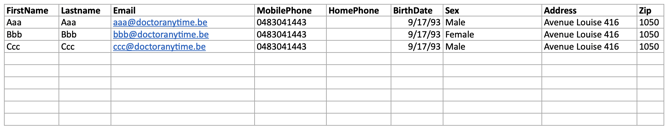
Le modèle suivant doit être respecté :
[](https://docs.google.com/spreadsheets/d/1p6R3UkRk3f8-OzKpri_J84IxwMg681fAT8l7dpLiw8I/edit?usp=sharing)
**Veuillez porter une attention particulière aux éléments suivants :**
- Vous pouvez laisser certaines colonnes vides si vous ne disposez pas des informations ou si vous ne les trouvez pas importantes pour votre activité. Cependant, **vous ne pouvez pas supprimer des colonnes**.
- Vous devez impérativement remplir les colonnes “Prénom” et “Nom”.
*Elles peuvent être vides dans le seul cas où ces informations sont regroupées dans la colonne “Nom complet”.*
- Veuillez suivre les formats présents dans le modèle ci-dessus à propos de la date de naissance (jj/mm/aaaa).
- Il est fortement recommandé de remplir les colonnes “Email” et “Numéro de téléphone (GSM)”. Vous pourrez ainsi informer par e-mail et / ou SMS vos patients des nouveaux types de consultations que vous proposez.
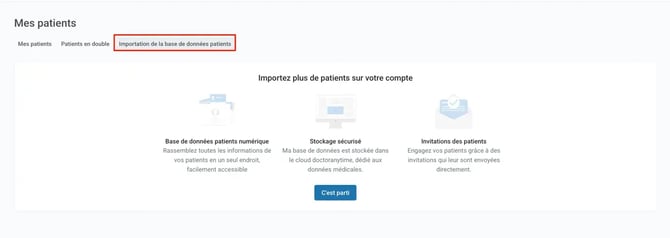
- Dans l'onglet **Patients**, sélectionnez l'onglet **Importation de la base de données patients**
****
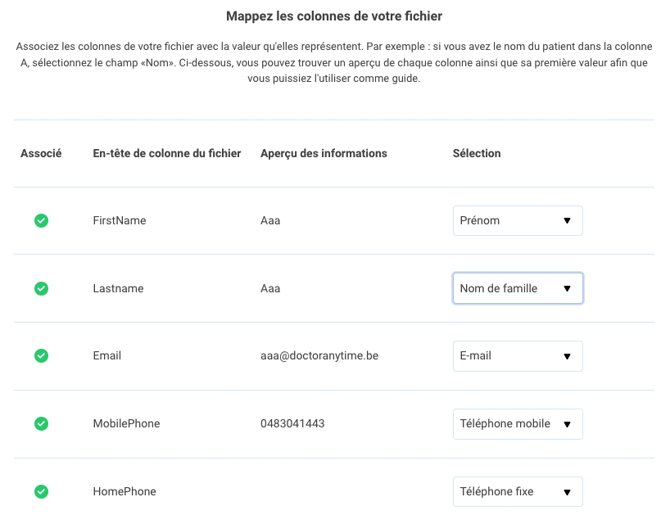
- **Sélection des colonnes à importer**
Associez les colonnes de votre fichier avec la valeur qu'elles représentent.
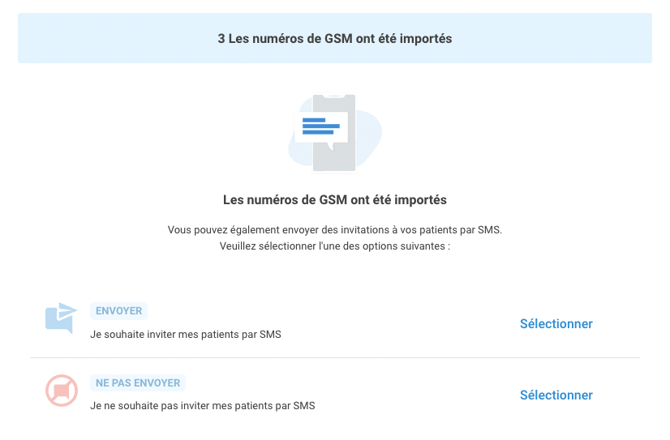
- **Envoi d'invitations à vos patients**
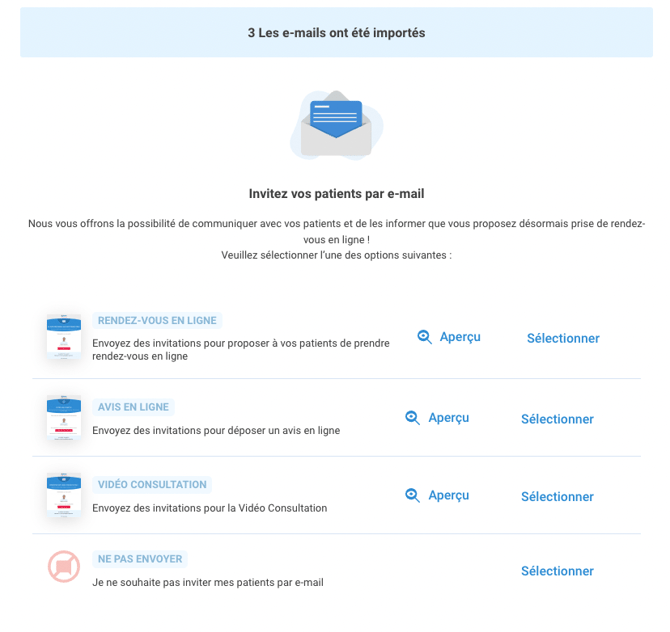
Une fois les informations de vos patients importées sur Doctoranytime, vous pouvez les inviter par e-mail et / ou SMS à prendre rendez-vous ou encore les informer sur les types de consultation que vous proposez actuellement.
Vous trouverez ci-dessous trois exemples d'e-mails que vous pouvez utiliser :
SMS
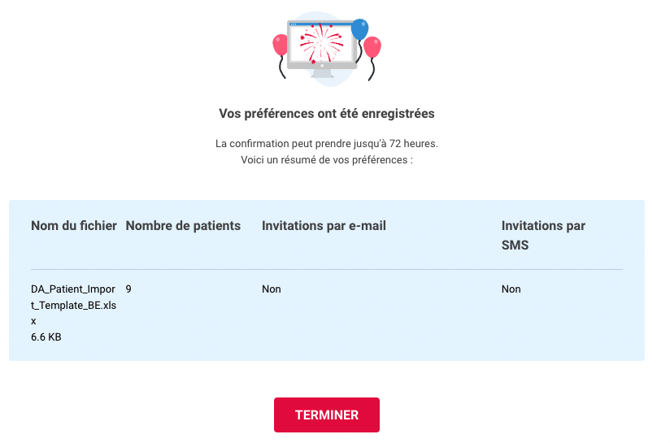
- **Confirmation de l'import**
Au bout de 72 heures, vous recevrez une confirmation de la part de notre équipe lorsque votre base de données patients est importée. L'envoi des invitations à vos patients sera également confirmé une fois la base de données patient importées.
Si vous avez des questions, vous pouvez toujours contacter notre support via le chat en bas à droite de votre écran.
- [Pour commencer](https://pro.doctoranytime.doctor/fr-be/help-center/pour-commencer?hsLang=fr-be)
- [Compte](https://pro.doctoranytime.doctor/fr-be/help-center/compte?hsLang=fr-be#main-content)
- [Paramètres du compte](https://pro.doctoranytime.doctor/fr-be/help-center/compte?hsLang=fr-be#param%C3%A8tres-du-compte)
- [Utilisateurs](https://pro.doctoranytime.doctor/fr-be/help-center/compte?hsLang=fr-be#utilisateurs)
- [Profil en ligne](https://pro.doctoranytime.doctor/fr-be/help-center/profil-en-ligne?hsLang=fr-be#main-content)
- [Services et traitements](https://pro.doctoranytime.doctor/fr-be/help-center/profil-en-ligne?hsLang=fr-be#services-et-traitements)
- [Promouvoir votre profil](https://pro.doctoranytime.doctor/fr-be/help-center/profil-en-ligne?hsLang=fr-be#promouvoir-votre-profil)
- [Gestion de votre cabinet](https://pro.doctoranytime.doctor/fr-be/help-center/gestion-de-votre-cabinet?hsLang=fr-be)
- [Gestion des disponibilités](https://pro.doctoranytime.doctor/fr-be/help-center/gestion-des-disponibilit%C3%A9s?hsLang=fr-be)
- [Agenda](https://pro.doctoranytime.doctor/fr-be/help-center/agenda?hsLang=fr-be#main-content)
- [Paramètres](https://pro.doctoranytime.doctor/fr-be/help-center/agenda?hsLang=fr-be#param%C3%A8tres)
- [Mes Patients](https://pro.doctoranytime.doctor/fr-be/help-center/mes-patients?hsLang=fr-be#main-content)
- [Importer la base de données](https://pro.doctoranytime.doctor/fr-be/help-center/mes-patients?hsLang=fr-be#importer-la-base-de-donn%C3%A9es)
- [Restrictions relatives aux patients](https://pro.doctoranytime.doctor/fr-be/help-center/mes-patients?hsLang=fr-be#restrictions-relatives-aux-patients)
- [Avis](https://pro.doctoranytime.doctor/fr-be/help-center/mes-patients?hsLang=fr-be#avis)
- [Communiquer avec mes patients](https://pro.doctoranytime.doctor/fr-be/help-center/mes-patients?hsLang=fr-be#communiquer-avec-mes-patients)
- [Les rendez-vous](https://pro.doctoranytime.doctor/fr-be/help-center/les-rendez-vous?hsLang=fr-be)
- [Vidéo Consultation](https://pro.doctoranytime.doctor/fr-be/help-center/vid%C3%A9o-consultation?hsLang=fr-be#main-content)
- [Ajouter un nouveau rendez-vous](https://pro.doctoranytime.doctor/fr-be/help-center/vid%C3%A9o-consultation?hsLang=fr-be#ajouter-un-nouveau-rendez-vous)
- [Video Consultation pour les centres médicaux](https://pro.doctoranytime.doctor/fr-be/help-center/vid%C3%A9o-consultation?hsLang=fr-be#video-consultation-pour-les-centres-m%C3%A9dicaux)
- [Sécurité des données et gestion des informations](https://pro.doctoranytime.doctor/fr-be/help-center/s%C3%A9curit%C3%A9-des-donn%C3%A9es-et-gestion-des-informations?hsLang=fr-be)
- [Questions et Réponses](https://pro.doctoranytime.doctor/fr-be/help-center/questions-et-r%C3%A9ponses?hsLang=fr-be)
- [Paiement en ligne](https://pro.doctoranytime.doctor/fr-be/help-center/paiement-en-ligne?hsLang=fr-be)
[.png?width=144&height=144&name=720x720gmail%20(1).png "doctoranytime")](http://www.doctoranytime.be)
[mailto:email@email.com](mailto:email@email.com)
Copyright © 2025, Doctoranytime