---
title: "Comment activer les Paiements en Ligne sur Doctoranytime : Un guide étape par étape"
description: Doctoranytime Help Center
---
[Passer au contenu](https://pro.doctoranytime.doctor/fr-be/help-center/comment-activer-les-paiements-en-ligne-sur-doctoranytime-un-guide-étape-par-étape#main-content)
- [Français - Belgique](https://pro.doctoranytime.doctor/fr-be/help-center/comment-activer-les-paiements-en-ligne-sur-doctoranytime-un-guide-%C3%A9tape-par-%C3%A9tape)
- [English - Belgium](https://pro.doctoranytime.doctor/en-be/help-center/help-center/how-to-activate-online-payments-on-doctoranytime-a-step-by-step-guide)
- [Nederlands - België](https://pro.doctoranytime.doctor/nl-be/help-center/hoe-online-betalingen-activeren-op-doctoranytime-een-stapsgewijze-handleiding)
Français - Belgique
Afficher le sous-menu pour les traductions
[](https://www.doctoranytime.be/)
Ouvrir la navigation principale
Fermer la navigation principale
- - [Français - Belgique](https://pro.doctoranytime.doctor/fr-be/help-center/comment-activer-les-paiements-en-ligne-sur-doctoranytime-un-guide-%C3%A9tape-par-%C3%A9tape)
- [English - Belgium](https://pro.doctoranytime.doctor/en-be/help-center/help-center/how-to-activate-online-payments-on-doctoranytime-a-step-by-step-guide)
- [Nederlands - België](https://pro.doctoranytime.doctor/nl-be/help-center/hoe-online-betalingen-activeren-op-doctoranytime-een-stapsgewijze-handleiding)
Français - Belgique
Afficher le sous-menu pour les traductions
- [Contact](https://pro.doctoranytime.be/fr/contactus)
[Contact](https://pro.doctoranytime.be/fr/contactus?hsLang=fr-be)
Comment pouvons-nous vous aider ?
- Il n'y a aucune suggestion car le champ de recherche est vide.
1. [Doctoranytime Help Center](https://pro.doctoranytime.doctor/fr-be/help-center?hsLang=fr-be)
2. [Pour commencer](https://pro.doctoranytime.doctor/fr-be/help-center/pour-commencer?hsLang=fr-be)
# Comment activer les Paiements en Ligne sur Doctoranytime : Un guide étape par étape
## Ce guide vous guidera à travers les étapes simples pour activer la fonctionnalité de paiement en ligne directement à partir de la plateforme Doctoranytime.
**Mise en route**
Avant de commencer, assurez-vous que vous avez un accès administrateur à votre compte Doctoranytime. Si vous n'avez pas les autorisations nécessaires, veuillez contacter l'administrateur de votre cabinet médical ou le support Doctoranytime.
**Étape 1 : Se connecter à son compte**
- **Action** : Allez sur la page de connexion de Doctoranytime et entrez votre identifiant et mot de passe.
- **Conseil** : Mettez la page de connexion dans vos favoris pour y accéder rapidement à l'avenir.
**Étape 2 : Naviguer vers les paramètres de paiement**
- **Action** : Lorsque vous êtes sur votre agenda, accédez au menu en cliquant sur votre photo en haut à droite et sélectionnez "**Paiements**".
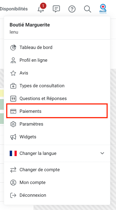
- **Remarque** : "Paiements" est représenté par une icône de carte de crédit dans le menu déroulant ou dans la barre latérale de votre compte.
**Étape 3 : Configurer votre compte Stripe**
- **Action** : Dans la section "**Paiements**", cliquez sur le bouton "Commencer" pour démarrer la configuration.
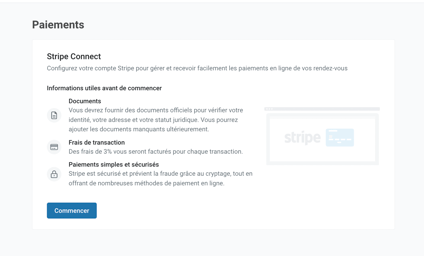
- **Détail** : Vous serez invité à entrer dans le processus de création d’un compte Stripe. Assurez-vous d'avoir ces informations à portée de main. Stripe est une plateforme de paiement en ligne qui permet aux entreprises d'accepter et de traiter les paiements par voie électronique de manière sécurisée et facile.
**Étape 4 : Saisissez vos coordonnées bancaires**
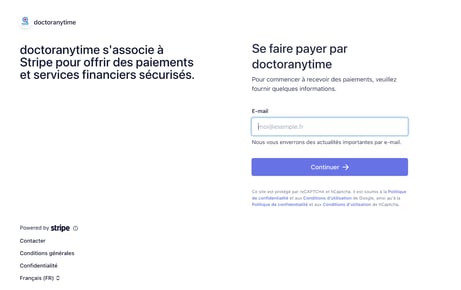
- **Action** : Vous serez redirigé vers Stripe. Remplissez les champs requis pour créer votre compte Stripe. N'hésitez pas à nous contacter si vous avez des questions.
**Étape 5 : Définissez votre paiement pour chaque pratique**
- **Action** : Gérez vos préférences de paiement en ligne pour **chaque cabinet** dans l’onglet “Cabinet médical”.
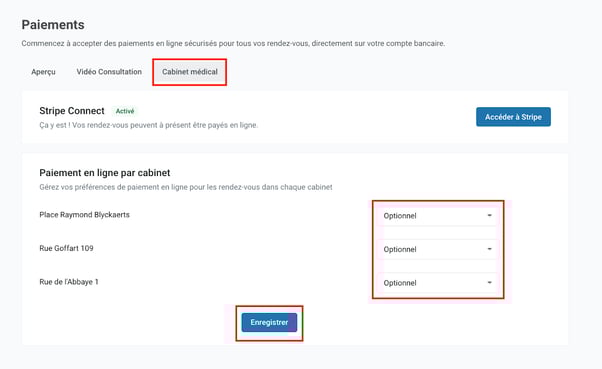
- **Action** : Après avoir vérifié vos informations, cliquez sur "Enregistrer" pour activer votre paiement en ligne.
**Étape 6 : Activez la Vidéo Consultation (facultatif)**
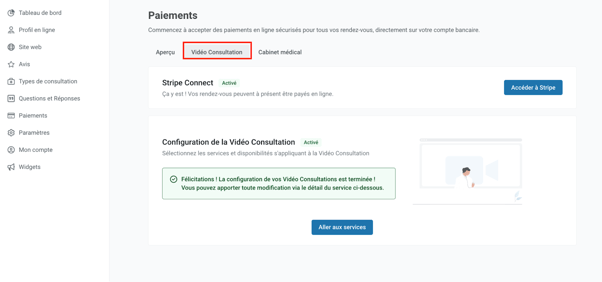
Action : Si vous êtes intéressé, vous pouvez également activer la fonction de Vidéo Consultation à partir de cette étape. Vous devez cliquer sur l'onglet Vidéo Consultation en haut de la page et lancer le processus de configuration. Cela prendra moins de 5 minutes.
**Étape 7 : Contrôlez tous vos paiements**
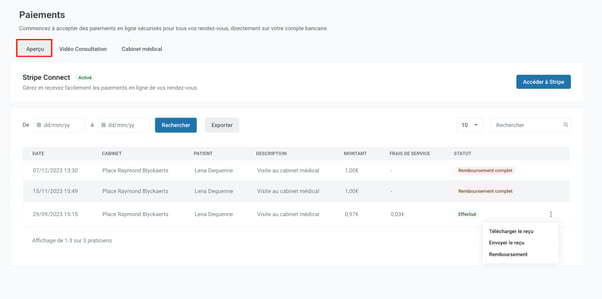
- **Action** : Vous pouvez gérer tous vos paiements à partir de l'onglet "Aperçu". À partir de cette page, vous pourrez voir l'état des paiements, exporter les paiements dans un fichier, envoyer un reçu à votre patient ou effectuer un remboursement.
**Conclusion**
Félicitations ! Vous avez activé avec succès les paiements en ligne pour votre compte Doctoranytime. Cette fonction vous permettra de gagner du temps, de réduire les absences et d'offrir à vos patients la possibilité de régler leur consultation de façon moderne et sécurisée.
**Besoin d'aide ?**
Si vous rencontrez des problèmes ou si vous avez des questions, n'hésitez pas à contacter le service d'assistance de Doctoranytime. Nous sommes là pour veiller à ce que votre expérience soit fluide et bénéfique pour vous et vos patients.
**Feedback**
Vos retours nous sont précieux. Après avoir utilisé la fonction de paiement en ligne, n'hésitez pas à nous faire part de vos commentaires afin que nous puissions continuer à améliorer nos services.
- [Pour commencer](https://pro.doctoranytime.doctor/fr-be/help-center/pour-commencer?hsLang=fr-be)
- [Compte](https://pro.doctoranytime.doctor/fr-be/help-center/compte?hsLang=fr-be#main-content)
- [Paramètres du compte](https://pro.doctoranytime.doctor/fr-be/help-center/compte?hsLang=fr-be#param%C3%A8tres-du-compte)
- [Utilisateurs](https://pro.doctoranytime.doctor/fr-be/help-center/compte?hsLang=fr-be#utilisateurs)
- [Profil en ligne](https://pro.doctoranytime.doctor/fr-be/help-center/profil-en-ligne?hsLang=fr-be#main-content)
- [Services et traitements](https://pro.doctoranytime.doctor/fr-be/help-center/profil-en-ligne?hsLang=fr-be#services-et-traitements)
- [Promouvoir votre profil](https://pro.doctoranytime.doctor/fr-be/help-center/profil-en-ligne?hsLang=fr-be#promouvoir-votre-profil)
- [Gestion de votre cabinet](https://pro.doctoranytime.doctor/fr-be/help-center/gestion-de-votre-cabinet?hsLang=fr-be)
- [Gestion des disponibilités](https://pro.doctoranytime.doctor/fr-be/help-center/gestion-des-disponibilit%C3%A9s?hsLang=fr-be)
- [Agenda](https://pro.doctoranytime.doctor/fr-be/help-center/agenda?hsLang=fr-be#main-content)
- [Paramètres](https://pro.doctoranytime.doctor/fr-be/help-center/agenda?hsLang=fr-be#param%C3%A8tres)
- [Mes Patients](https://pro.doctoranytime.doctor/fr-be/help-center/mes-patients?hsLang=fr-be#main-content)
- [Importer la base de données](https://pro.doctoranytime.doctor/fr-be/help-center/mes-patients?hsLang=fr-be#importer-la-base-de-donn%C3%A9es)
- [Restrictions relatives aux patients](https://pro.doctoranytime.doctor/fr-be/help-center/mes-patients?hsLang=fr-be#restrictions-relatives-aux-patients)
- [Avis](https://pro.doctoranytime.doctor/fr-be/help-center/mes-patients?hsLang=fr-be#avis)
- [Communiquer avec mes patients](https://pro.doctoranytime.doctor/fr-be/help-center/mes-patients?hsLang=fr-be#communiquer-avec-mes-patients)
- [Les rendez-vous](https://pro.doctoranytime.doctor/fr-be/help-center/les-rendez-vous?hsLang=fr-be)
- [Vidéo Consultation](https://pro.doctoranytime.doctor/fr-be/help-center/vid%C3%A9o-consultation?hsLang=fr-be#main-content)
- [Ajouter un nouveau rendez-vous](https://pro.doctoranytime.doctor/fr-be/help-center/vid%C3%A9o-consultation?hsLang=fr-be#ajouter-un-nouveau-rendez-vous)
- [Video Consultation pour les centres médicaux](https://pro.doctoranytime.doctor/fr-be/help-center/vid%C3%A9o-consultation?hsLang=fr-be#video-consultation-pour-les-centres-m%C3%A9dicaux)
- [Sécurité des données et gestion des informations](https://pro.doctoranytime.doctor/fr-be/help-center/s%C3%A9curit%C3%A9-des-donn%C3%A9es-et-gestion-des-informations?hsLang=fr-be)
- [Questions et Réponses](https://pro.doctoranytime.doctor/fr-be/help-center/questions-et-r%C3%A9ponses?hsLang=fr-be)
- [Paiement en ligne](https://pro.doctoranytime.doctor/fr-be/help-center/paiement-en-ligne?hsLang=fr-be)
[.png?width=144&height=144&name=720x720gmail%20(1).png "doctoranytime")](http://www.doctoranytime.be)
[mailto:email@email.com](mailto:email@email.com)
Copyright © 2025, Doctoranytime