---
title: Comment accéder à une Vidéo Consultation
description: Comment accéder à la vidéoconsultation le jour du rendez-vous ?
---
[Passer au contenu](https://pro.doctoranytime.doctor/fr-be/help-center/comment-accéder-à-une-vidéo-consultation#main-content)
- [Français - Belgique](https://pro.doctoranytime.doctor/fr-be/help-center/comment-acc%C3%A9der-%C3%A0-une-vid%C3%A9o-consultation)
- [English - Belgium](https://pro.doctoranytime.doctor/en-be/help-center/help-center/how-to-join-a-video-consultation)
- [Nederlands - België](https://pro.doctoranytime.doctor/nl-be/help-center/hoe-start-ik-een-videoconsultatie)
Français - Belgique
Afficher le sous-menu pour les traductions
[](https://www.doctoranytime.be/)
Ouvrir la navigation principale
Fermer la navigation principale
- - [Français - Belgique](https://pro.doctoranytime.doctor/fr-be/help-center/comment-acc%C3%A9der-%C3%A0-une-vid%C3%A9o-consultation)
- [English - Belgium](https://pro.doctoranytime.doctor/en-be/help-center/help-center/how-to-join-a-video-consultation)
- [Nederlands - België](https://pro.doctoranytime.doctor/nl-be/help-center/hoe-start-ik-een-videoconsultatie)
Français - Belgique
Afficher le sous-menu pour les traductions
- [Contact](https://pro.doctoranytime.be/fr/contactus)
[Contact](https://pro.doctoranytime.be/fr/contactus?hsLang=fr-be)
Comment pouvons-nous vous aider ?
- Il n'y a aucune suggestion car le champ de recherche est vide.
1. [Doctoranytime Help Center](https://pro.doctoranytime.doctor/fr-be/help-center?hsLang=fr-be)
2. [Vidéo Consultation](https://pro.doctoranytime.doctor/fr-be/help-center/vid%C3%A9o-consultation?hsLang=fr-be)
# Comment accéder à une Vidéo Consultation
Il y a 3 façons d'accéder à une Vidéo Consultation :
1. A partir du rendez-vous dans votre Agenda, en cliquant sur le rendez-vous, puis sur le bouton “Commencer la Vidéo Consultation”.

2. À partir du lien que vous recevrez par courriel 10 minutes avant l'heure prévue.
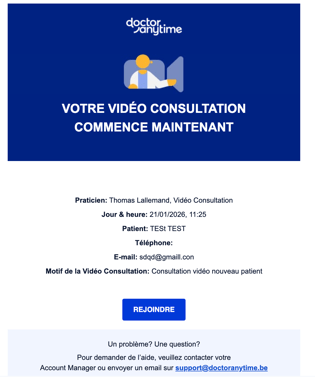
3. Depuis le lien que vous recevrez par sms 10 minutes avant l'heure prévue.
4. Depuis chacune de ces 3 options, vous serez redirigé vers la salle d'attente de la **Vidéo Consultation**.
Vous allez pouvoir paramétrer votre micro ainsi que votre caméra et flouter l'arrière plan si besoin :
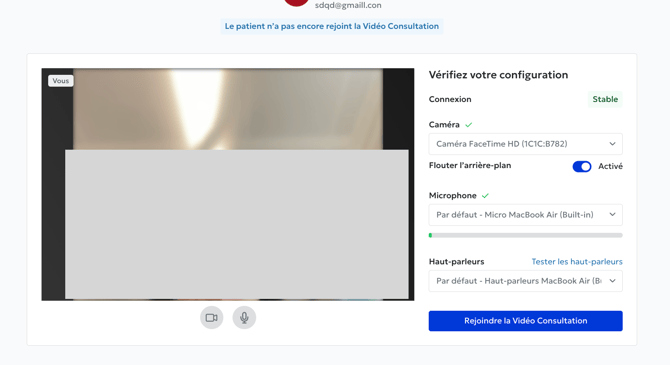
Une fois connecté, vous pouvez voir la liste de vos rendez-vous de la journée, les coordonnées du patient, et vous avez également accès à un chat afin de communiquer avec le patient/
5 .Si le patient ne s'est pas connecté à la consultation, l'écran affiche le message suivant:
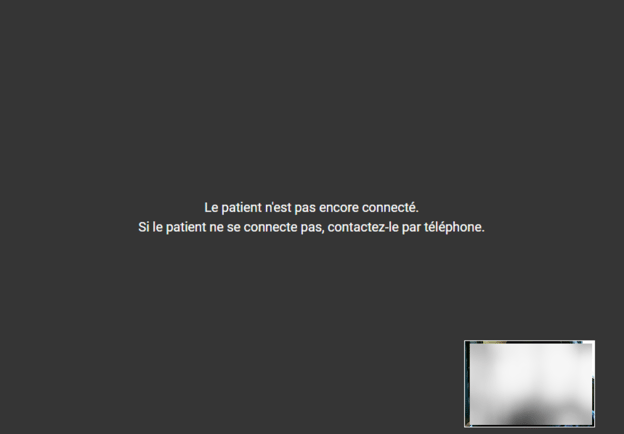
6\. Une fois que le patient se connecte, la vidéoconsultation peut débuter.
7\. Lors de la vidéoconsultation, vous pouvez partager votre écran, couper votre caméra ou votre micro en cliquant sur les icônes correspondantes.
8. Quand vous souhaitez finir la Vidéo Consultation, cliquez sur **Terminer la consultation**.
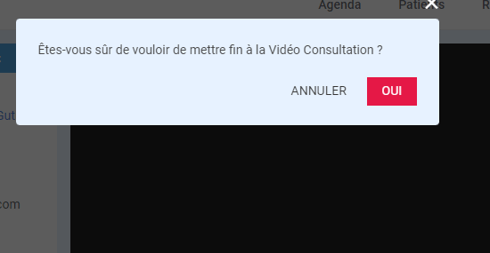
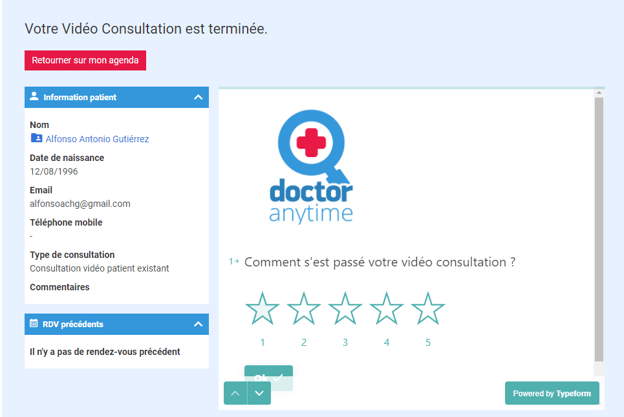
9. A la fin, un court sondage vous permet d’évaluer la Vidéo Consultation et ainsi reporter d’éventuels problèmes techniques à notre équipe.
- [Pour commencer](https://pro.doctoranytime.doctor/fr-be/help-center/pour-commencer?hsLang=fr-be)
- [Compte](https://pro.doctoranytime.doctor/fr-be/help-center/compte?hsLang=fr-be#main-content)
- [Paramètres du compte](https://pro.doctoranytime.doctor/fr-be/help-center/compte?hsLang=fr-be#param%C3%A8tres-du-compte)
- [Utilisateurs](https://pro.doctoranytime.doctor/fr-be/help-center/compte?hsLang=fr-be#utilisateurs)
- [Profil en ligne](https://pro.doctoranytime.doctor/fr-be/help-center/profil-en-ligne?hsLang=fr-be#main-content)
- [Services et traitements](https://pro.doctoranytime.doctor/fr-be/help-center/profil-en-ligne?hsLang=fr-be#services-et-traitements)
- [Promouvoir votre profil](https://pro.doctoranytime.doctor/fr-be/help-center/profil-en-ligne?hsLang=fr-be#promouvoir-votre-profil)
- [Gestion de votre cabinet](https://pro.doctoranytime.doctor/fr-be/help-center/gestion-de-votre-cabinet?hsLang=fr-be)
- [Gestion des disponibilités](https://pro.doctoranytime.doctor/fr-be/help-center/gestion-des-disponibilit%C3%A9s?hsLang=fr-be)
- [Agenda](https://pro.doctoranytime.doctor/fr-be/help-center/agenda?hsLang=fr-be#main-content)
- [Paramètres](https://pro.doctoranytime.doctor/fr-be/help-center/agenda?hsLang=fr-be#param%C3%A8tres)
- [Mes Patients](https://pro.doctoranytime.doctor/fr-be/help-center/mes-patients?hsLang=fr-be#main-content)
- [Importer la base de données](https://pro.doctoranytime.doctor/fr-be/help-center/mes-patients?hsLang=fr-be#importer-la-base-de-donn%C3%A9es)
- [Restrictions relatives aux patients](https://pro.doctoranytime.doctor/fr-be/help-center/mes-patients?hsLang=fr-be#restrictions-relatives-aux-patients)
- [Avis](https://pro.doctoranytime.doctor/fr-be/help-center/mes-patients?hsLang=fr-be#avis)
- [Communiquer avec mes patients](https://pro.doctoranytime.doctor/fr-be/help-center/mes-patients?hsLang=fr-be#communiquer-avec-mes-patients)
- [Les rendez-vous](https://pro.doctoranytime.doctor/fr-be/help-center/les-rendez-vous?hsLang=fr-be)
- [Vidéo Consultation](https://pro.doctoranytime.doctor/fr-be/help-center/vid%C3%A9o-consultation?hsLang=fr-be#main-content)
- [Ajouter un nouveau rendez-vous](https://pro.doctoranytime.doctor/fr-be/help-center/vid%C3%A9o-consultation?hsLang=fr-be#ajouter-un-nouveau-rendez-vous)
- [Video Consultation pour les centres médicaux](https://pro.doctoranytime.doctor/fr-be/help-center/vid%C3%A9o-consultation?hsLang=fr-be#video-consultation-pour-les-centres-m%C3%A9dicaux)
- [Sécurité des données et gestion des informations](https://pro.doctoranytime.doctor/fr-be/help-center/s%C3%A9curit%C3%A9-des-donn%C3%A9es-et-gestion-des-informations?hsLang=fr-be)
- [Questions et Réponses](https://pro.doctoranytime.doctor/fr-be/help-center/questions-et-r%C3%A9ponses?hsLang=fr-be)
- [Paiement en ligne](https://pro.doctoranytime.doctor/fr-be/help-center/paiement-en-ligne?hsLang=fr-be)
[.png?width=144&height=144&name=720x720gmail%20(1).png "doctoranytime")](http://www.doctoranytime.be)
[mailto:email@email.com](mailto:email@email.com)
Copyright © 2025, Doctoranytime