---
title: Activer le paiement en ligne
description: Vous souhaitez demander le paiement à vos patients lorsqu'ils prennent rendez-vous en ligne ?
---
[Passer au contenu](https://pro.doctoranytime.doctor/fr-be/help-center/activer-le-paiement-en-ligne#main-content)
- [Français - Belgique](https://pro.doctoranytime.doctor/fr-be/help-center/activer-le-paiement-en-ligne)
- [English - Belgium](https://pro.doctoranytime.doctor/en-be/help-center/activate-online-payment)
- [Nederlands - België](https://pro.doctoranytime.doctor/nl-be/help-center/online-betaling-activeren)
Français - Belgique
Afficher le sous-menu pour les traductions
[](https://www.doctoranytime.be/)
Ouvrir la navigation principale
Fermer la navigation principale
- - [Français - Belgique](https://pro.doctoranytime.doctor/fr-be/help-center/activer-le-paiement-en-ligne)
- [English - Belgium](https://pro.doctoranytime.doctor/en-be/help-center/activate-online-payment)
- [Nederlands - België](https://pro.doctoranytime.doctor/nl-be/help-center/online-betaling-activeren)
Français - Belgique
Afficher le sous-menu pour les traductions
- [Contact](https://pro.doctoranytime.be/fr/contactus)
[Contact](https://pro.doctoranytime.be/fr/contactus?hsLang=fr-be)
Comment pouvons-nous vous aider ?
- Il n'y a aucune suggestion car le champ de recherche est vide.
1. [Doctoranytime Help Center](https://pro.doctoranytime.doctor/fr-be/help-center?hsLang=fr-be)
2. [Paiement](https://pro.doctoranytime.doctor/fr-be/help-center/paiement?hsLang=fr-be)
# Activer le paiement en ligne
Vous souhaitez demander le paiement à vos patients lorsqu'ils prennent rendez-vous en ligne ? Il vous suffit d'activer le paiement en ligne. L'activation est simple et dure environ 15 minutes, le temps de configurer votre compte Stripe.
## 1. Accéder au paiement en ligne
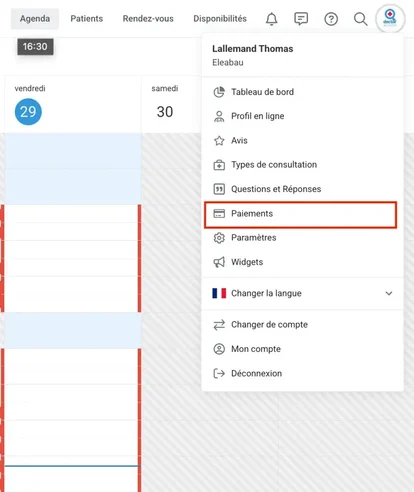
Depuis le **Menu Utilisateur**, sélectionnez **Tableau de bord**, puis cliquez sur **Paiement en ligne**.
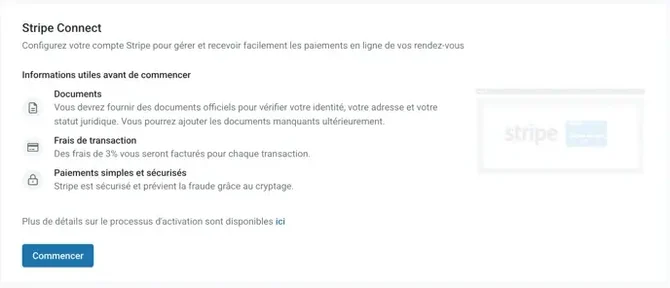
Cliquez ensuite sur **Commencer**. Vous serez guidé·e à travers un processus en deux grandes phases pour activer votre compte Stripe.
## 2. Configurer votre compte Stripe
Suivez les différentes étapes indiquées par Stripe. Il vous sera demandé de compléter certaines informations, dont votre **type d'entité** et votre **IBAN**, afin de définir le compte bancaire sur lequel vous recevrez les paiements de vos patients.
## 3. Vérification finale du compte
Une fois ces informations complétées, il ne reste qu'une dernière étape : la vérification du compte.
Un résumé de toutes les informations saisies vous est présenté ; vous pouvez les vérifier ou les modifier. Il vous faudra ensuite confirmer votre identité à l'aide de justificatifs.
🎉 Votre compte Stripe est créé et vous pouvez utiliser le paiement en ligne.
## 4. Activer le paiement pour votre cabinet
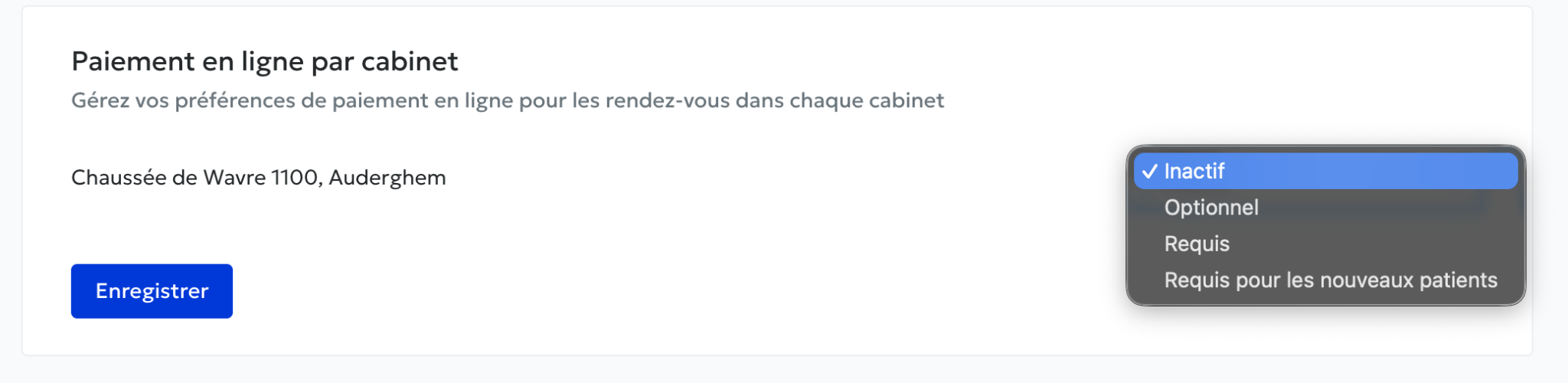
Il ne vous reste plus qu'à choisir si vous souhaitez activer le paiement en ligne pour votre cabinet. Pour cela, vous pouvez le faire depuis l’onglet Paiements -\> Cabinets :
- [Pour commencer](https://pro.doctoranytime.doctor/fr-be/help-center/pour-commencer?hsLang=fr-be)
- [Compte et abonnement](https://pro.doctoranytime.doctor/fr-be/help-center/compte-et-abonnement?hsLang=fr-be#main-content)
- [Compte](https://pro.doctoranytime.doctor/fr-be/help-center/compte-et-abonnement?hsLang=fr-be#compte)
- [Abonnement](https://pro.doctoranytime.doctor/fr-be/help-center/compte-et-abonnement?hsLang=fr-be#abonnement)
- [Profil et visibilité](https://pro.doctoranytime.doctor/fr-be/help-center/profil-et-visibilit%C3%A9?hsLang=fr-be#main-content)
- [Profil en ligne](https://pro.doctoranytime.doctor/fr-be/help-center/profil-et-visibilit%C3%A9?hsLang=fr-be#profil-en-ligne)
- [Visibilité](https://pro.doctoranytime.doctor/fr-be/help-center/profil-et-visibilit%C3%A9?hsLang=fr-be#visibilit%C3%A9)
- [Cabinets](https://pro.doctoranytime.doctor/fr-be/help-center/profil-et-visibilit%C3%A9?hsLang=fr-be#cabinets)
- [Gérer mes types de consultations](https://pro.doctoranytime.doctor/fr-be/help-center/g%C3%A9rer-mes-types-de-consultations?hsLang=fr-be)
- [Gérer mon agenda](https://pro.doctoranytime.doctor/fr-be/help-center/g%C3%A9rer-mon-agenda?hsLang=fr-be#main-content)
- [Disponibilités](https://pro.doctoranytime.doctor/fr-be/help-center/g%C3%A9rer-mon-agenda?hsLang=fr-be#disponibilit%C3%A9s)
- [Rendez-vous](https://pro.doctoranytime.doctor/fr-be/help-center/g%C3%A9rer-mon-agenda?hsLang=fr-be#rendez-vous)
- [SMS](https://pro.doctoranytime.doctor/fr-be/help-center/g%C3%A9rer-mon-agenda?hsLang=fr-be#sms)
- [Tâches](https://pro.doctoranytime.doctor/fr-be/help-center/g%C3%A9rer-mon-agenda?hsLang=fr-be#t%C3%A2ches)
- [Affichage de l'agenda](https://pro.doctoranytime.doctor/fr-be/help-center/g%C3%A9rer-mon-agenda?hsLang=fr-be#affichage-de-lagenda)
- [Synchroniser l'agenda](https://pro.doctoranytime.doctor/fr-be/help-center/g%C3%A9rer-mon-agenda?hsLang=fr-be#synchroniser-lagenda)
- [Utilisateurs](https://pro.doctoranytime.doctor/fr-be/help-center/g%C3%A9rer-mon-agenda?hsLang=fr-be#utilisateurs)
- [Gérer mes patients](https://pro.doctoranytime.doctor/fr-be/help-center/g%C3%A9rer-mes-patients?hsLang=fr-be#main-content)
- [Patients](https://pro.doctoranytime.doctor/fr-be/help-center/g%C3%A9rer-mes-patients?hsLang=fr-be#patients)
- [Paiement](https://pro.doctoranytime.doctor/fr-be/help-center/paiement?hsLang=fr-be)
- [Vidéo-consultation](https://pro.doctoranytime.doctor/fr-be/help-center/vid%C3%A9o-consultation?hsLang=fr-be)
- [Sécurité des données](https://pro.doctoranytime.doctor/fr-be/help-center/s%C3%A9curit%C3%A9-des-donn%C3%A9es?hsLang=fr-be)
- [Centres médicaux](https://pro.doctoranytime.doctor/fr-be/help-center/centres-m%C3%A9dicaux?hsLang=fr-be)
[](http://www.doctoranytime.be)
[mailto:email@email.com](mailto:email@email.com)
Copyright © 2025, Doctoranytime