---
title: Open a time slot every other week
description: Would you like to offer appointments only every other week? Here is how to configure your Doctoranytime agenda to alternate available weeks automatically.
---
[Skip to content](https://pro.doctoranytime.doctor/en-be/help-center/open-a-time-slot-every-other-week#main-content)
- [English - Belgium](https://pro.doctoranytime.doctor/en-be/help-center/open-a-time-slot-every-other-week)
- [Français - Belgique](https://pro.doctoranytime.doctor/fr-be/help-center/ouvrir-un-creneau-horaire-une-semaine-sur-deux)
- [Nederlands - België](https://pro.doctoranytime.doctor/nl-be/help-center/een-tijdslot-om-de-twee-weken-openen)
English - Belgium
Show submenu for translations
[](https://www.doctoranytime.be/en)
Open main navigation
Close main navigation
- - [English - Belgium](https://pro.doctoranytime.doctor/en-be/help-center/open-a-time-slot-every-other-week)
- [Français - Belgique](https://pro.doctoranytime.doctor/fr-be/help-center/ouvrir-un-creneau-horaire-une-semaine-sur-deux)
- [Nederlands - België](https://pro.doctoranytime.doctor/nl-be/help-center/een-tijdslot-om-de-twee-weken-openen)
English - Belgium
Show submenu for translations
- [Contact us](https://pro.doctoranytime.be/en/en/contactus)
[Contact us](https://pro.doctoranytime.be/en/en/contactus?hsLang=en-be)
How can we help you?
- There are no suggestions because the search field is empty.
1. [Doctoranytime Help Center](https://pro.doctoranytime.doctor/en-be/help-center?hsLang=en-be)
2. [Managing my agenda](https://pro.doctoranytime.doctor/en-be/help-center/managing-my-agenda?hsLang=en-be)
3. [Availability](https://pro.doctoranytime.doctor/en-be/help-center/managing-my-agenda?hsLang=en-be#availability)
# Open a time slot every other week
Would you like to offer appointments only every other week? Here is how to configure your Doctoranytime agenda to alternate available weeks automatically.
1. Configure your usual time slot
First, create your time slot under ‘Availability’, as you would for a regular weekly schedule.
For the steps, see our article ‘[How do I open a time slot in my Doctoranytime agenda?](https://pro.doctoranytime.doctor/en-be/help-center/how-do-i-open-a-time-slot?hsLang=en-be)’.
Once saved, the time slot will be offered every week by default.
1. Block slots every other week
To offer availability only every other week, you must then create recurring unavailability.
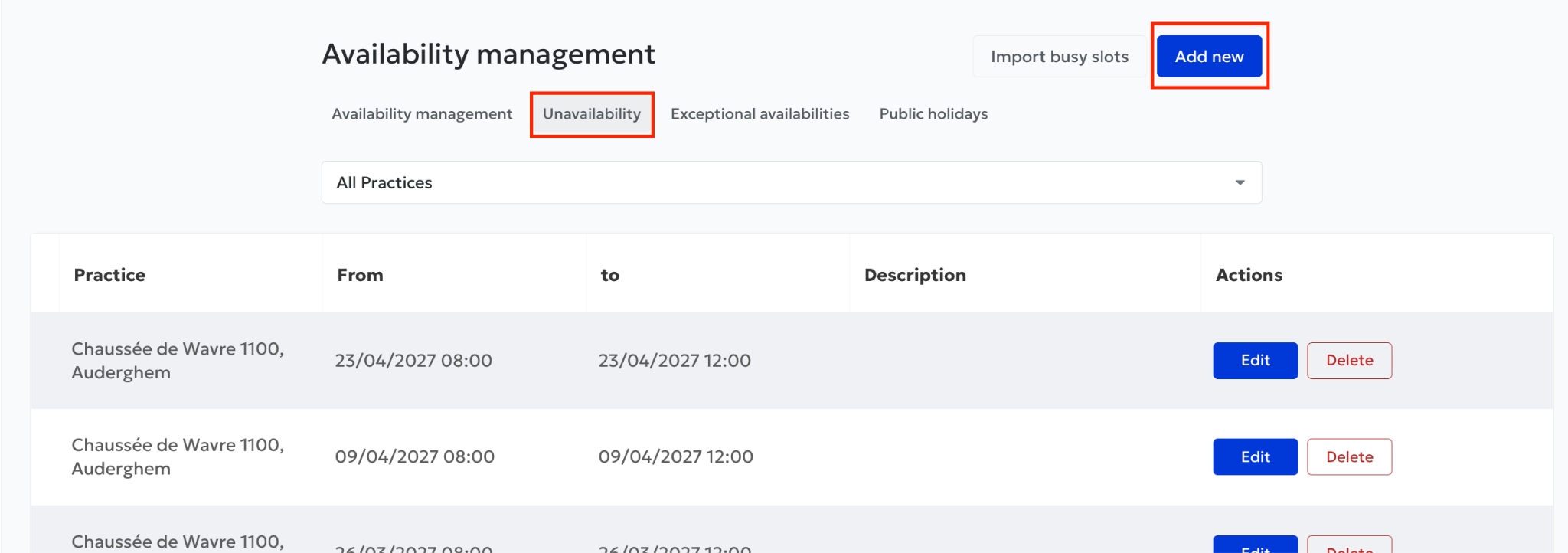
1. Go to ‘Availability’ in your agenda.
2. Click ‘Unavailability’, just above your practice address.
3. Click ‘Add new’.
4. In ‘From’, enter the first date on which you do not want to work and the start time of your unavailability.
5. In ‘To’, enter the end date and end time of the slot (on the same day).
Make sure to select the hours corresponding to the period you want to block.
Once you have entered the dates and times:
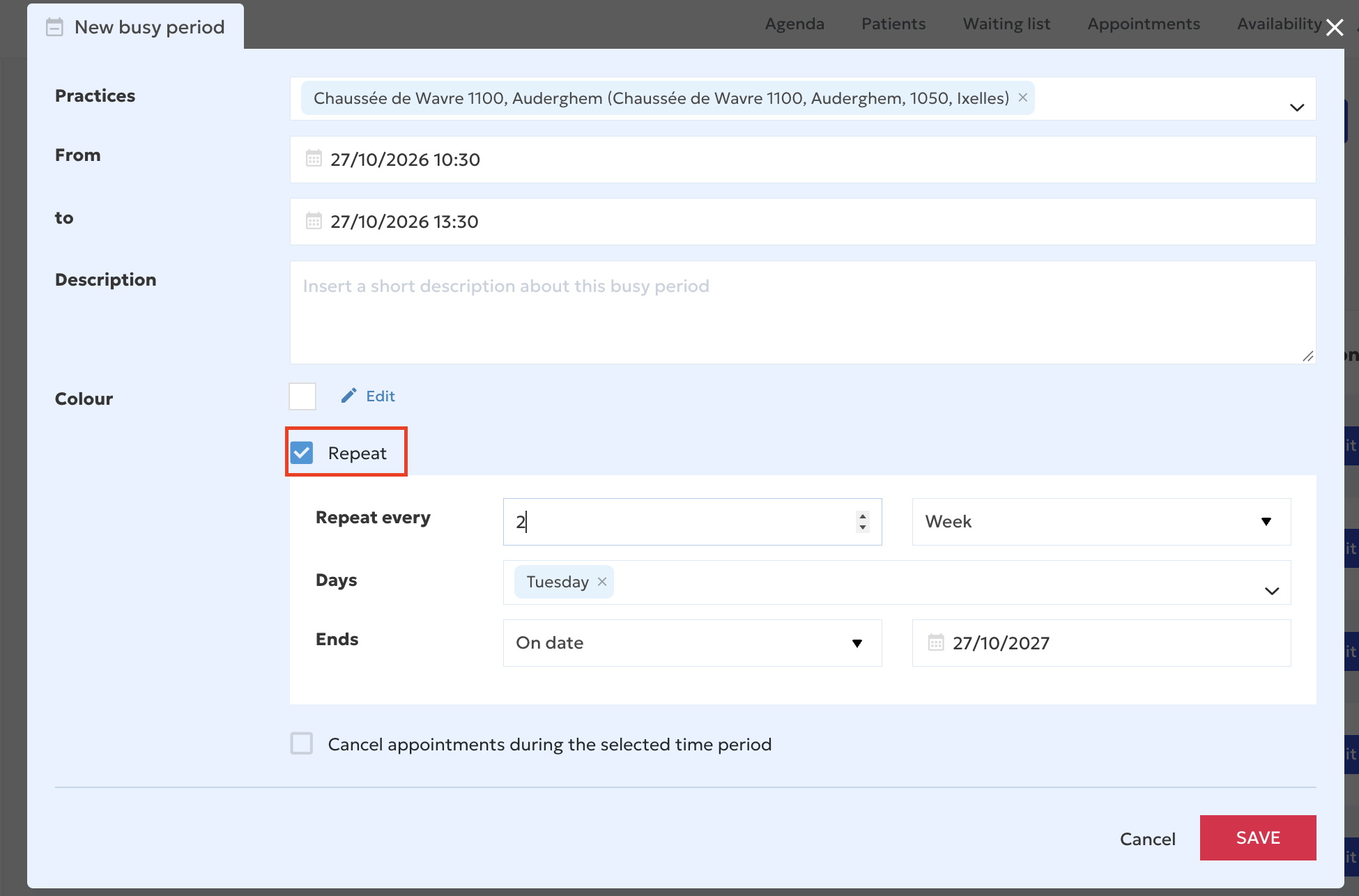
1. Tick ‘Repeat’.
2. Select ‘Repeat every 2 weeks’.
3. Decide when the repetition should end. You can choose:
4. A specific end date.
5. A number of repetitions after which the unavailability ends.
6. Click ‘Save’.
Your unavailability will now repeat automatically every two weeks.
After saving, return to your agenda and check the following weeks.
- [Getting started](https://pro.doctoranytime.doctor/en-be/help-center/getting-started?hsLang=en-be)
- [Account and subscription](https://pro.doctoranytime.doctor/en-be/help-center/account-and-subscription?hsLang=en-be#main-content)
- [Account](https://pro.doctoranytime.doctor/en-be/help-center/account-and-subscription?hsLang=en-be#account)
- [Subscription](https://pro.doctoranytime.doctor/en-be/help-center/account-and-subscription?hsLang=en-be#subscription)
- [Profile and visibility](https://pro.doctoranytime.doctor/en-be/help-center/profile-and-visibility?hsLang=en-be#main-content)
- [Online profile](https://pro.doctoranytime.doctor/en-be/help-center/profile-and-visibility?hsLang=en-be#online-profile)
- [Visibility](https://pro.doctoranytime.doctor/en-be/help-center/profile-and-visibility?hsLang=en-be#visibility)
- [Practices](https://pro.doctoranytime.doctor/en-be/help-center/profile-and-visibility?hsLang=en-be#practices)
- [Managing my services](https://pro.doctoranytime.doctor/en-be/help-center/managing-my-services?hsLang=en-be)
- [Managing my agenda](https://pro.doctoranytime.doctor/en-be/help-center/managing-my-agenda?hsLang=en-be#main-content)
- [Availability](https://pro.doctoranytime.doctor/en-be/help-center/managing-my-agenda?hsLang=en-be#availability)
- [Appointments](https://pro.doctoranytime.doctor/en-be/help-center/managing-my-agenda?hsLang=en-be#appointments)
- [SMS](https://pro.doctoranytime.doctor/en-be/help-center/managing-my-agenda?hsLang=en-be#sms)
- [Tasks](https://pro.doctoranytime.doctor/en-be/help-center/managing-my-agenda?hsLang=en-be#tasks)
- [Agenda display](https://pro.doctoranytime.doctor/en-be/help-center/managing-my-agenda?hsLang=en-be#agenda-display)
- [Agenda synchronisation](https://pro.doctoranytime.doctor/en-be/help-center/managing-my-agenda?hsLang=en-be#agenda-synchronisation)
- [Users](https://pro.doctoranytime.doctor/en-be/help-center/managing-my-agenda?hsLang=en-be#users)
- [Managing my patients](https://pro.doctoranytime.doctor/en-be/help-center/managing-my-patients?hsLang=en-be#main-content)
- [Patients](https://pro.doctoranytime.doctor/en-be/help-center/managing-my-patients?hsLang=en-be#patients)
- [Payment](https://pro.doctoranytime.doctor/en-be/help-center/payment?hsLang=en-be)
- [Video consultation](https://pro.doctoranytime.doctor/en-be/help-center/video-consultation?hsLang=en-be)
- [Data security](https://pro.doctoranytime.doctor/en-be/help-center/data-security?hsLang=en-be)
- [Medical centres](https://pro.doctoranytime.doctor/en-be/help-center/medical-centres?hsLang=en-be)
[](http://www.doctoranytime.be)
[mailto:email@email.com](mailto:email@email.com)
Copyright © 2025, Doctoranytime