---
title: Synchronize with an iCloud account
description: Doctoranytime Help Center
---
[Skip to content](https://pro.doctoranytime.doctor/en-be/help-center/help-center/synchronize-with-an-icloud-account#main-content)
- [English - Belgium](https://pro.doctoranytime.doctor/en-be/help-center/help-center/synchronize-with-an-icloud-account)
- [Français - Belgique](https://pro.doctoranytime.doctor/fr-be/help-center/synchronisation-avec-un-compte-icloud)
- [Nederlands - België](https://pro.doctoranytime.doctor/nl-be/help-center/synchroniseren-met-een-icloud-account)
English - Belgium
Show submenu for translations
[](https://www.doctoranytime.be/en)
Open main navigation
Close main navigation
- - [English - Belgium](https://pro.doctoranytime.doctor/en-be/help-center/help-center/synchronize-with-an-icloud-account)
- [Français - Belgique](https://pro.doctoranytime.doctor/fr-be/help-center/synchronisation-avec-un-compte-icloud)
- [Nederlands - België](https://pro.doctoranytime.doctor/nl-be/help-center/synchroniseren-met-een-icloud-account)
English - Belgium
Show submenu for translations
- [Contact us](https://pro.doctoranytime.be/en/en/contactus)
[Contact us](https://pro.doctoranytime.be/en/en/contactus?hsLang=en-be)
How can we help you?
- There are no suggestions because the search field is empty.
1. [Doctoranytime Help Center](https://pro.doctoranytime.doctor/en-be/help-center?hsLang=en-be)
2. [Agenda online](https://pro.doctoranytime.doctor/en-be/help-center/agenda-online?hsLang=en-be)
3. [Agenda Settings](https://pro.doctoranytime.doctor/en-be/help-center/agenda-online?hsLang=en-be#agenda-settings)
# Synchronize with an iCloud account
## Synchronize your agenda with an iCloud calendar
#### 1. Cronofy integration
To synchronize your iCloud calendar, first follow the steps for [Synchronization with Cronofy](https://pro.doctoranytime.doctor/help-center/synchronization-with-cronofy?hsLang=en-be)
**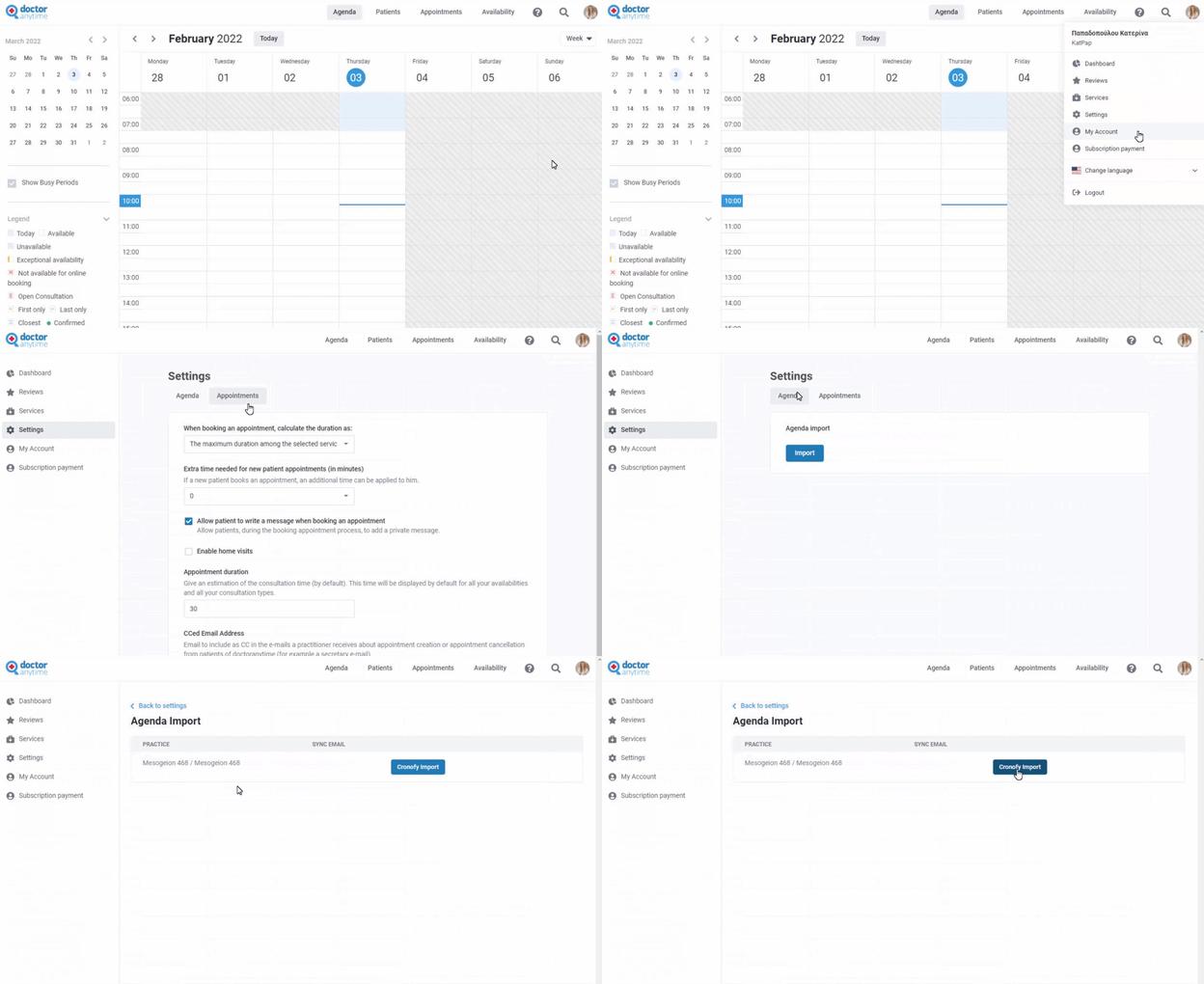**
Remember to **click** on “Cronofy import” button in blue, where a new page will open for Cronofy.
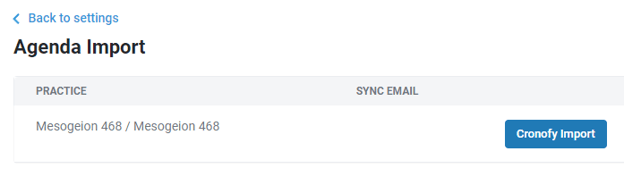
If you don't find it, this option is not available in your current package. Get in touch with your contact person to upgrade it !
#### **2. Choice of calendar to synchronize**
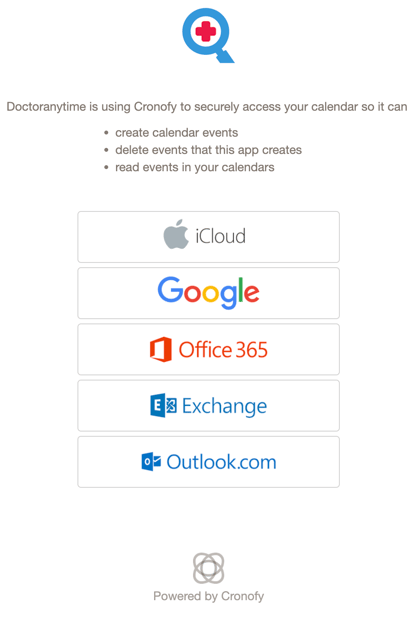
**Choose** your calendar **provider** to synchronize.
In your case, it is an iCloud calendar. So select the first option.
#### 3. iCloud
Cronofy will ask for **secure access** to your calendar.
**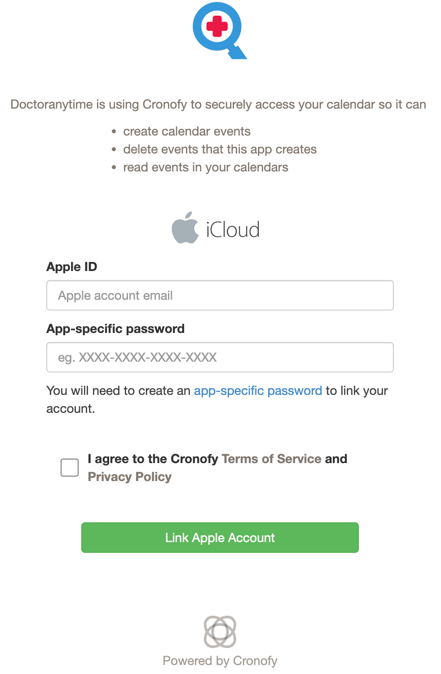**
Before filling in the fields with your information, you must first have authorization to connect. To do so, click on the**app-specific password** markedin blue.
#### 4. Password **for application**
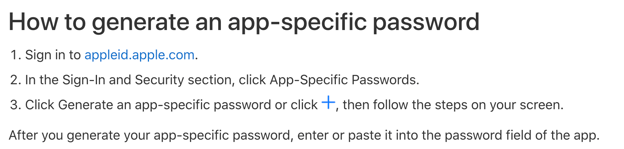
After having clicked on the **app-specific password,** you will be redirected to an apple page page.
There you need to see the “**How to generate an app-specific password**” section and click on **appleid.apple.com** again markedin blue.
****
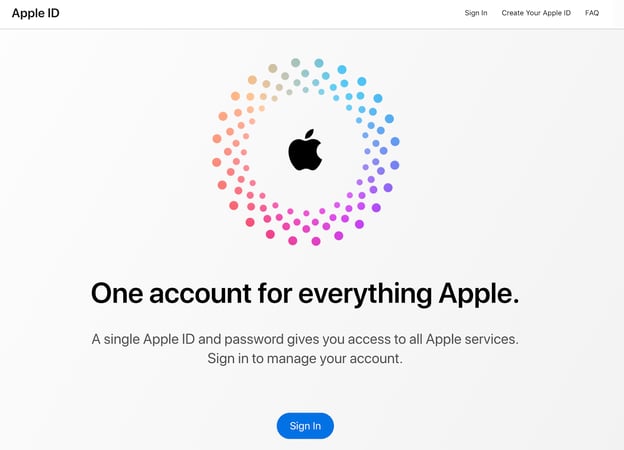
#### **5. Apple ID page**
Once again, a new page will open. Here, click in the **Sign In** button in blue.
****
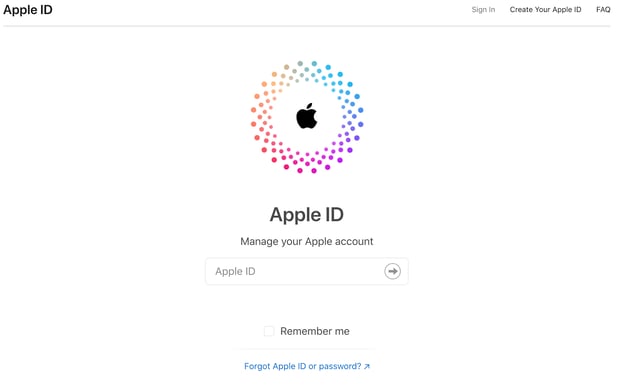
Then you will be asked to enter your **Apple ID** (your icloud account email address) and your usual **password** linked to the ID.
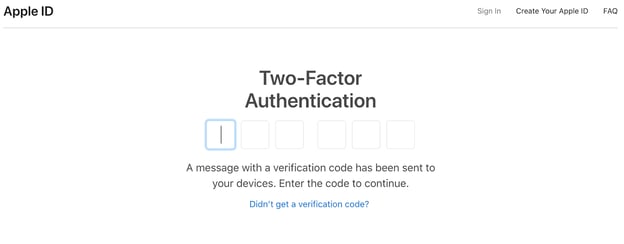
A **two-factor authentication** is required, so you will need to add the code showed in your device.
#### 6. Generate a password
Once you have entered your Apple account, you will see the **App-Specific Passwords** section at the bottom.
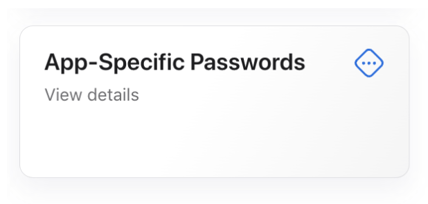
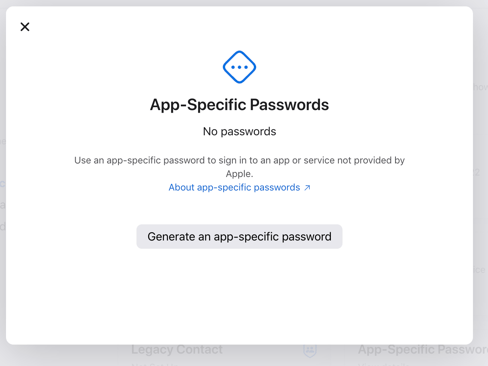
When you click on the section, you will be given the option to generate the password you need. **Click** in the **Generate an app-specific password** button in gray.
Then, specify which application you want to generate a password for.
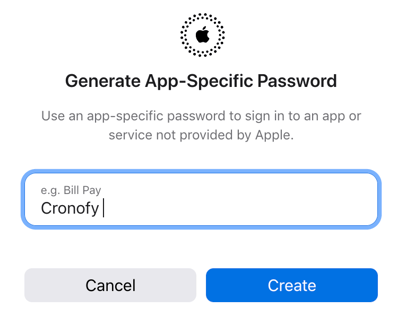
Click on Create, where you will be asked to **Confirm** your Apple ID **password**
**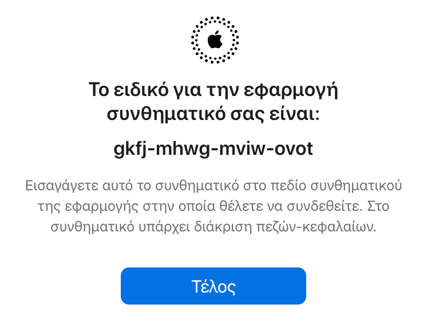**
Your password has bow been generated! **Copy** it or **write it down** the password to use it in the next steps.
#### 7. Cronofy
Return to the Cronofy window (step 3).
****
Here enter your Apple ID and the password generated in the previous step.
Don'r forget to **accept** the terms of use and click **Link Apple Account**.
#### 8. Configure the main options
Select the calendars concerned as well as those in which the doctoranytime events will be transcribed.
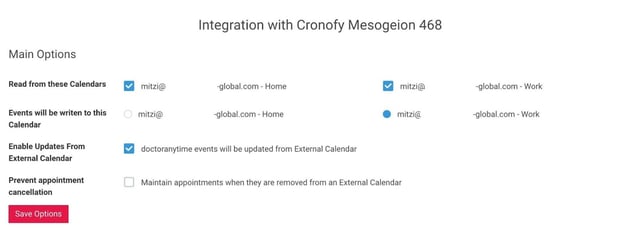
When done, **click** on the **Save options** button.
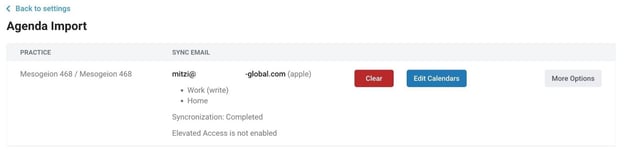
Now your calendar has been synchronized with your doctoranytime agenda!
- [Get started](https://pro.doctoranytime.doctor/en-be/help-center/get-started?hsLang=en-be)
- [Account](https://pro.doctoranytime.doctor/en-be/help-center/account?hsLang=en-be#main-content)
- [Account Settings](https://pro.doctoranytime.doctor/en-be/help-center/account?hsLang=en-be#account-settings)
- [Users](https://pro.doctoranytime.doctor/en-be/help-center/account?hsLang=en-be#users)
- [Public profile](https://pro.doctoranytime.doctor/en-be/help-center/public-profile?hsLang=en-be#main-content)
- [Services and Treatments](https://pro.doctoranytime.doctor/en-be/help-center/public-profile?hsLang=en-be#services-and-treatments)
- [Promote Profile](https://pro.doctoranytime.doctor/en-be/help-center/public-profile?hsLang=en-be#promote-profile)
- [Practice Management](https://pro.doctoranytime.doctor/en-be/help-center/practice-management?hsLang=en-be)
- [Availability Management](https://pro.doctoranytime.doctor/en-be/help-center/availability-management?hsLang=en-be)
- [Agenda online](https://pro.doctoranytime.doctor/en-be/help-center/agenda-online?hsLang=en-be#main-content)
- [Agenda Settings](https://pro.doctoranytime.doctor/en-be/help-center/agenda-online?hsLang=en-be#agenda-settings)
- [My Patients](https://pro.doctoranytime.doctor/en-be/help-center/my-patients?hsLang=en-be#main-content)
- [Import database](https://pro.doctoranytime.doctor/en-be/help-center/my-patients?hsLang=en-be#import-database)
- [Patient restrictions](https://pro.doctoranytime.doctor/en-be/help-center/my-patients?hsLang=en-be#patient-restrictions)
- [Reviews](https://pro.doctoranytime.doctor/en-be/help-center/my-patients?hsLang=en-be#reviews)
- [Communication with my patients](https://pro.doctoranytime.doctor/en-be/help-center/my-patients?hsLang=en-be#communication-with-my-patients)
- [Appointments](https://pro.doctoranytime.doctor/en-be/help-center/appointments?hsLang=en-be)
- [Video consultation](https://pro.doctoranytime.doctor/en-be/help-center/video-consultation?hsLang=en-be#main-content)
- [Adding a new appointment](https://pro.doctoranytime.doctor/en-be/help-center/video-consultation?hsLang=en-be#adding-a-new-appointment)
- [Video-Consultation for medical centers](https://pro.doctoranytime.doctor/en-be/help-center/video-consultation?hsLang=en-be#video-consultation-for-medical-centers)
- [Data Security and information management](https://pro.doctoranytime.doctor/en-be/help-center/data-security-and-information-management?hsLang=en-be)
- [Questions and Answers](https://pro.doctoranytime.doctor/en-be/help-center/questions-and-answers?hsLang=en-be)
- [Online payment](https://pro.doctoranytime.doctor/en-be/help-center/online-payment?hsLang=en-be)
[.png?width=144&height=144&name=720x720gmail%20(1).png "doctoranytime")](http://www.doctoranytime.be)
[mailto:email@email.com](mailto:email@email.com)
Copyright © 2025, Doctoranytime