---
title: Agenda layout
description: Doctoranytime Help Center
---
[Skip to content](https://pro.doctoranytime.doctor/en-be/help-center/help-center/agenda-layout#main-content)
- [English - Belgium](https://pro.doctoranytime.doctor/en-be/help-center/help-center/agenda-layout)
- [Français - Belgique](https://pro.doctoranytime.doctor/fr-be/help-center/composants-de-votre-agenda)
- [Nederlands - België](https://pro.doctoranytime.doctor/nl-be/help-center/agenda-layout-nl)
English - Belgium
Show submenu for translations
[](https://www.doctoranytime.be/en)
Open main navigation
Close main navigation
- - [English - Belgium](https://pro.doctoranytime.doctor/en-be/help-center/help-center/agenda-layout)
- [Français - Belgique](https://pro.doctoranytime.doctor/fr-be/help-center/composants-de-votre-agenda)
- [Nederlands - België](https://pro.doctoranytime.doctor/nl-be/help-center/agenda-layout-nl)
English - Belgium
Show submenu for translations
- [Contact us](https://pro.doctoranytime.be/en/en/contactus)
[Contact us](https://pro.doctoranytime.be/en/en/contactus?hsLang=en-be)
How can we help you?
- There are no suggestions because the search field is empty.
1. [Doctoranytime Help Center](https://pro.doctoranytime.doctor/en-be/help-center?hsLang=en-be)
2. [Agenda online](https://pro.doctoranytime.doctor/en-be/help-center/agenda-online?hsLang=en-be)
# Agenda layout
## Getting to know all the elements of the agenda will help you optimize its use. This article will give you a general overview of what you can find in the Agenda.
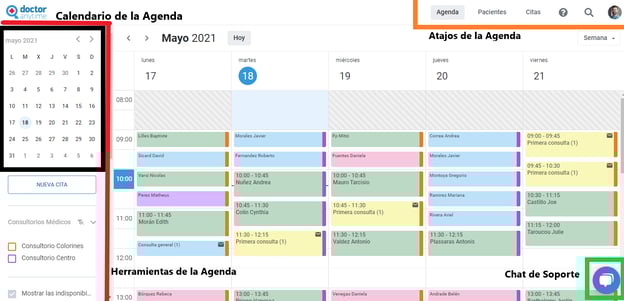
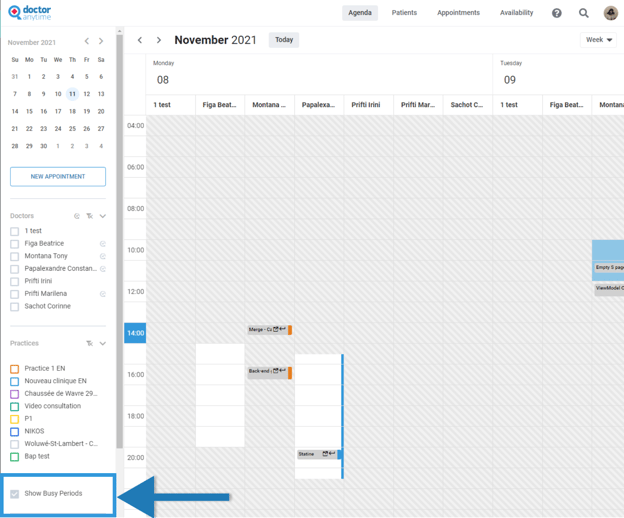
The agenda is composed of the toolbar, the agenda-calendar, the shortcuts and the support chat.
#### 
### **Toolbar**
The toolbar is located in the left part of your screen and consists of the following:
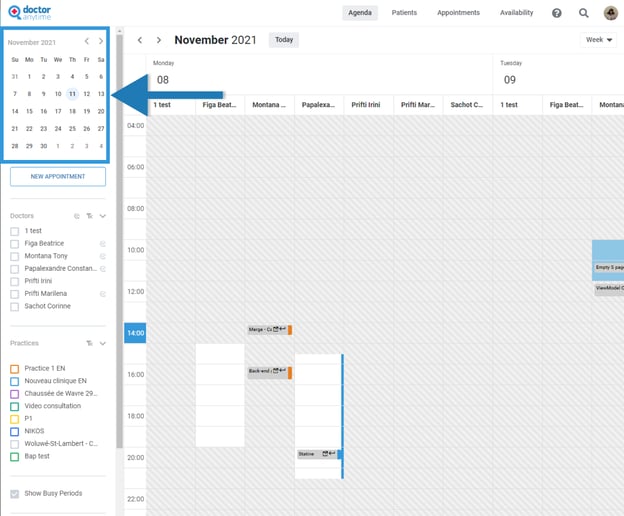
1. **Calendar**: Shows a monthly calendar and indicates the current date.
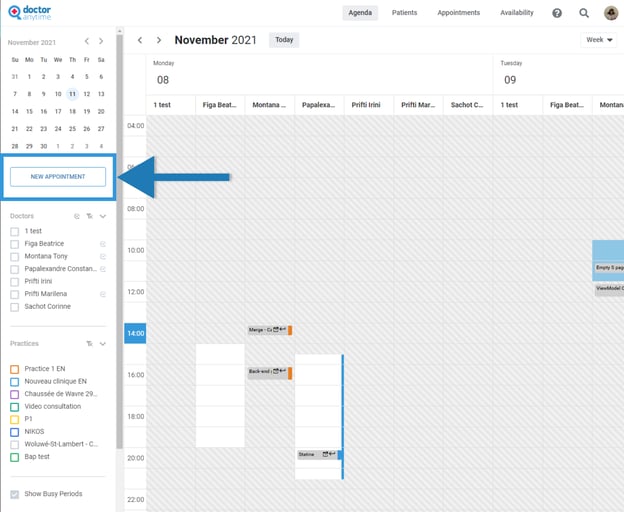
2. **New Appointment button**: Allows you to quickly schedule a new appointment.
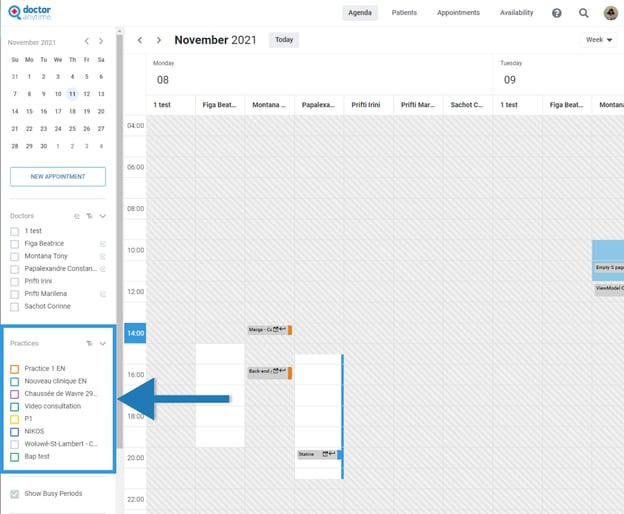
3. Your **practices**: Here you can change your agenda view depending on the practice. For example, if you only attend a specific practice on Thursdays and you only want to see the appointments for that day, you can select that view. This also applies for its Video Consultation availability.
4. Busy **periods**: Display or hide your unavailability by enabling this option.
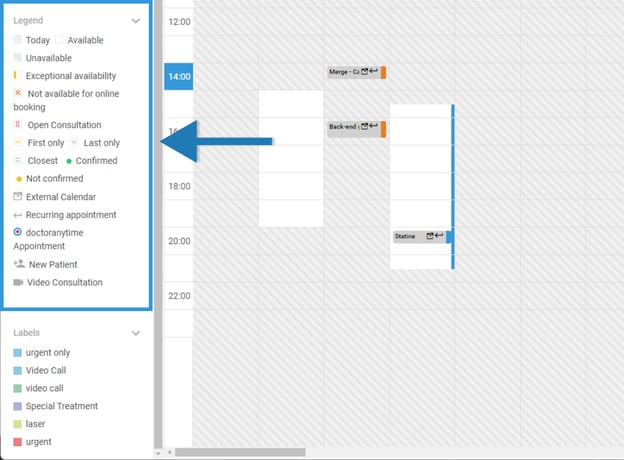
5. **Legends**: These will appear in your agenda and appointments. For more detail click here.
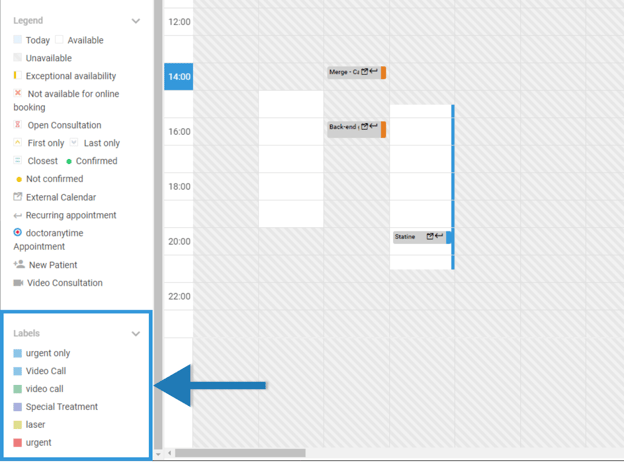
6. **Labels**: Categorize your time slots by labeling your availability and give them color coding their background.
### **Calendar**
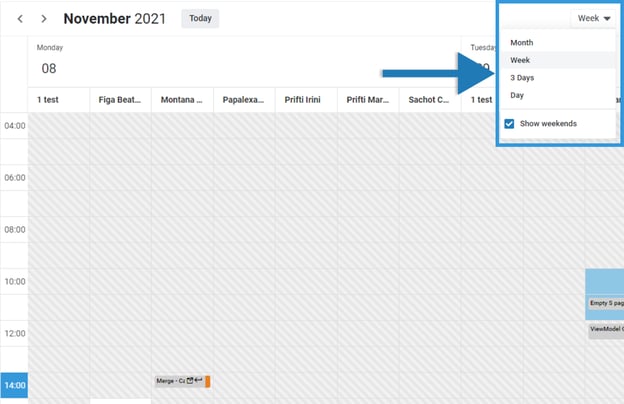
The main calendar is located In the central section. Here you will see all your appointments and availability. You can change the view of your calendar through the drop-down menu in the top right corner of the agenda. The options are of the central section of the agenda with the options Month/ Week/ 3 days and Day.
### **Shortcuts**
In the upper-right part, you will find some shortcut buttons. They will help you access sections faster.
1. Agenda - brings you back to the agenda
2. Patients
3. Appointments
4. Availability
5. ? Help - Help center
6. Voip
7. Search for patients
8. User Menu - which you can use to navigate through the different sections of the platform


- [Get started](https://pro.doctoranytime.doctor/en-be/help-center/get-started?hsLang=en-be)
- [Account](https://pro.doctoranytime.doctor/en-be/help-center/account?hsLang=en-be#main-content)
- [Account Settings](https://pro.doctoranytime.doctor/en-be/help-center/account?hsLang=en-be#account-settings)
- [Users](https://pro.doctoranytime.doctor/en-be/help-center/account?hsLang=en-be#users)
- [Public profile](https://pro.doctoranytime.doctor/en-be/help-center/public-profile?hsLang=en-be#main-content)
- [Services and Treatments](https://pro.doctoranytime.doctor/en-be/help-center/public-profile?hsLang=en-be#services-and-treatments)
- [Promote Profile](https://pro.doctoranytime.doctor/en-be/help-center/public-profile?hsLang=en-be#promote-profile)
- [Practice Management](https://pro.doctoranytime.doctor/en-be/help-center/practice-management?hsLang=en-be)
- [Availability Management](https://pro.doctoranytime.doctor/en-be/help-center/availability-management?hsLang=en-be)
- [Agenda online](https://pro.doctoranytime.doctor/en-be/help-center/agenda-online?hsLang=en-be#main-content)
- [Agenda Settings](https://pro.doctoranytime.doctor/en-be/help-center/agenda-online?hsLang=en-be#agenda-settings)
- [My Patients](https://pro.doctoranytime.doctor/en-be/help-center/my-patients?hsLang=en-be#main-content)
- [Import database](https://pro.doctoranytime.doctor/en-be/help-center/my-patients?hsLang=en-be#import-database)
- [Patient restrictions](https://pro.doctoranytime.doctor/en-be/help-center/my-patients?hsLang=en-be#patient-restrictions)
- [Reviews](https://pro.doctoranytime.doctor/en-be/help-center/my-patients?hsLang=en-be#reviews)
- [Communication with my patients](https://pro.doctoranytime.doctor/en-be/help-center/my-patients?hsLang=en-be#communication-with-my-patients)
- [Appointments](https://pro.doctoranytime.doctor/en-be/help-center/appointments?hsLang=en-be)
- [Video consultation](https://pro.doctoranytime.doctor/en-be/help-center/video-consultation?hsLang=en-be#main-content)
- [Adding a new appointment](https://pro.doctoranytime.doctor/en-be/help-center/video-consultation?hsLang=en-be#adding-a-new-appointment)
- [Video-Consultation for medical centers](https://pro.doctoranytime.doctor/en-be/help-center/video-consultation?hsLang=en-be#video-consultation-for-medical-centers)
- [Data Security and information management](https://pro.doctoranytime.doctor/en-be/help-center/data-security-and-information-management?hsLang=en-be)
- [Questions and Answers](https://pro.doctoranytime.doctor/en-be/help-center/questions-and-answers?hsLang=en-be)
- [Online payment](https://pro.doctoranytime.doctor/en-be/help-center/online-payment?hsLang=en-be)
[.png?width=144&height=144&name=720x720gmail%20(1).png "doctoranytime")](http://www.doctoranytime.be)
[mailto:email@email.com](mailto:email@email.com)
Copyright © 2025, Doctoranytime