---
title: Add a new service
description: You can create as many services as needed, defining their visibility, price, duration, practice locations and information for patients.
---
[Skip to content](https://pro.doctoranytime.doctor/en-be/help-center/add-a-new-service#main-content)
- [English - Belgium](https://pro.doctoranytime.doctor/en-be/help-center/add-a-new-service)
- [Français - Belgique](https://pro.doctoranytime.doctor/fr-be/help-center/ajouter-un-type-de-consultation)
- [Nederlands - België](https://pro.doctoranytime.doctor/nl-be/help-center/een-nieuwe-dienst-toevoegen)
English - Belgium
Show submenu for translations
[](https://www.doctoranytime.be/en)
Open main navigation
Close main navigation
- - [English - Belgium](https://pro.doctoranytime.doctor/en-be/help-center/add-a-new-service)
- [Français - Belgique](https://pro.doctoranytime.doctor/fr-be/help-center/ajouter-un-type-de-consultation)
- [Nederlands - België](https://pro.doctoranytime.doctor/nl-be/help-center/een-nieuwe-dienst-toevoegen)
English - Belgium
Show submenu for translations
- [Contact us](https://pro.doctoranytime.be/en/en/contactus)
[Contact us](https://pro.doctoranytime.be/en/en/contactus?hsLang=en-be)
How can we help you?
- There are no suggestions because the search field is empty.
1. [Doctoranytime Help Center](https://pro.doctoranytime.doctor/en-be/help-center?hsLang=en-be)
2. [Managing my services](https://pro.doctoranytime.doctor/en-be/help-center/managing-my-services?hsLang=en-be)
# Add a new service
You can create as many services as needed, defining their visibility, price, duration, practice locations and information for patients.
## How do I add a service?
1. Sign in to Doctoranytime.
2. Click your profile picture at the top right and open Services.
3. Click Add a new service.
4. Choose a service from the list for your specialty, or select Create custom service at the bottom.
## 1. Choose whether patients can book the service
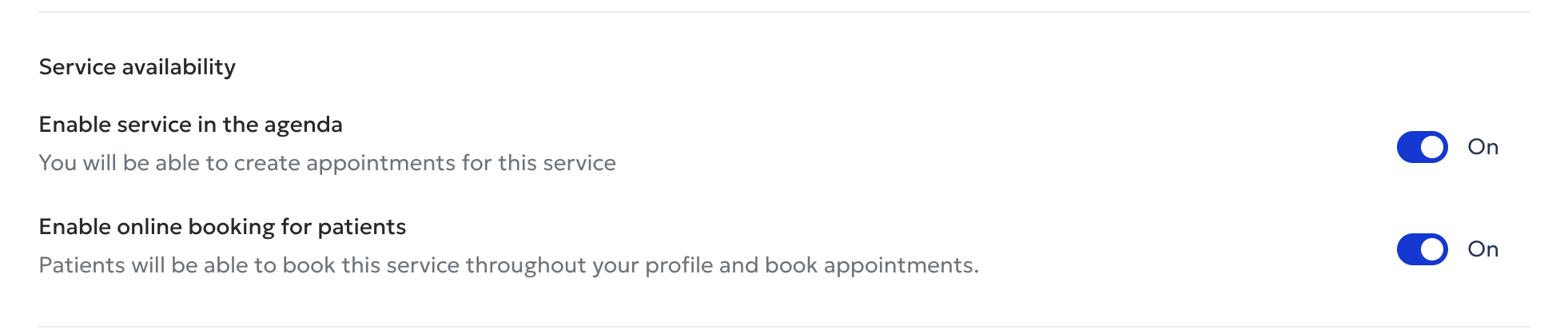
**'Enable service in the agenda'** lets you use the service when entering appointments yourself. **'Enable online booking for patients'** makes it available for online booking. Both switches must be ON for patients to book online.
Enabling it only in the agenda does not make it visible to patients.
## 2. Enter the consultation price
Choose a fixed price and enter the amount, or a variable price and enter the minimum on the left and maximum on the right. Use Price description to explain price differences, possible reimbursement, INAMI rates or other relevant fee information.
## 3. Set the duration
Enter the actual time needed so Doctoranytime can show your availability correctly.
## 4. Select practice locations
Choose only the practices where you offer this service.
## 5. Allow group bookings
Allow several people to book the same time slot individually, for example for a class, workshop or support group. Enter the maximum number of participants (e.g. 10). This is not intended for couples' consultations.
## 6. Describe the service
Use Service details to explain the purpose, procedure, target patients and when they should select this appointment.
## 7. Add patient instructions
Add practical guidance, such as asking patients attending a knee assessment to wear shorts or loose trousers.
## 8. Save
Click Save once all details are complete.
## Good to know
Check whether a suitable service already exists in the list for your specialty. Some predefined services also appear in patient searches. Create a custom service only if none of the existing options is appropriate.
- [Getting started](https://pro.doctoranytime.doctor/en-be/help-center/getting-started?hsLang=en-be)
- [Account and subscription](https://pro.doctoranytime.doctor/en-be/help-center/account-and-subscription?hsLang=en-be#main-content)
- [Account](https://pro.doctoranytime.doctor/en-be/help-center/account-and-subscription?hsLang=en-be#account)
- [Subscription](https://pro.doctoranytime.doctor/en-be/help-center/account-and-subscription?hsLang=en-be#subscription)
- [Profile and visibility](https://pro.doctoranytime.doctor/en-be/help-center/profile-and-visibility?hsLang=en-be#main-content)
- [Online profile](https://pro.doctoranytime.doctor/en-be/help-center/profile-and-visibility?hsLang=en-be#online-profile)
- [Visibility](https://pro.doctoranytime.doctor/en-be/help-center/profile-and-visibility?hsLang=en-be#visibility)
- [Practices](https://pro.doctoranytime.doctor/en-be/help-center/profile-and-visibility?hsLang=en-be#practices)
- [Managing my services](https://pro.doctoranytime.doctor/en-be/help-center/managing-my-services?hsLang=en-be)
- [Managing my agenda](https://pro.doctoranytime.doctor/en-be/help-center/managing-my-agenda?hsLang=en-be#main-content)
- [Availability](https://pro.doctoranytime.doctor/en-be/help-center/managing-my-agenda?hsLang=en-be#availability)
- [Appointments](https://pro.doctoranytime.doctor/en-be/help-center/managing-my-agenda?hsLang=en-be#appointments)
- [SMS](https://pro.doctoranytime.doctor/en-be/help-center/managing-my-agenda?hsLang=en-be#sms)
- [Tasks](https://pro.doctoranytime.doctor/en-be/help-center/managing-my-agenda?hsLang=en-be#tasks)
- [Agenda display](https://pro.doctoranytime.doctor/en-be/help-center/managing-my-agenda?hsLang=en-be#agenda-display)
- [Agenda synchronisation](https://pro.doctoranytime.doctor/en-be/help-center/managing-my-agenda?hsLang=en-be#agenda-synchronisation)
- [Users](https://pro.doctoranytime.doctor/en-be/help-center/managing-my-agenda?hsLang=en-be#users)
- [Managing my patients](https://pro.doctoranytime.doctor/en-be/help-center/managing-my-patients?hsLang=en-be#main-content)
- [Patients](https://pro.doctoranytime.doctor/en-be/help-center/managing-my-patients?hsLang=en-be#patients)
- [Payment](https://pro.doctoranytime.doctor/en-be/help-center/payment?hsLang=en-be)
- [Video consultation](https://pro.doctoranytime.doctor/en-be/help-center/video-consultation?hsLang=en-be)
- [Data security](https://pro.doctoranytime.doctor/en-be/help-center/data-security?hsLang=en-be)
- [Medical centres](https://pro.doctoranytime.doctor/en-be/help-center/medical-centres?hsLang=en-be)
[](http://www.doctoranytime.be)
[mailto:email@email.com](mailto:email@email.com)
Copyright © 2025, Doctoranytime